ชั้น 29 ออฟฟิศเศส แอท เซ็นทรัลเวิลด์

999/9 พระราม 1 กรุงเทพฯ 10330

บริการตลอด 24 ชั่วโมง

ทุกวัน ไม่เว้นวันหยุด

0-2107-3466

โทรเลยดิจะรออะไร

Home Plesk Plesk Admin Level วิธีลบ IP Address ที่กำหนดไว้สำหรับการเข้าสู่ระบบ Plesk Admin

วิธีลบ IP Address ที่กำหนดไว้สำหรับการเข้าสู่ระบบ Plesk Admin

หากต้องการลบ IP Address หรือ Network ที่เคยกำหนดไว้สำหรับการเข้าสู่ระบบ Plesk Admin ผ่านเมนู IP Access Restriction Management ผู้ดูแลระบบสามารถลบรายการที่ไม่ต้องการใช้งานได้ โดยการลบจะมีผลตามโหมดที่ใช้งานอยู่ เช่น โหมดบล็อก IP หรือโหมดอนุญาตเฉพาะ IP โดยดำเนินการตามขั้นตอนต่อไปนี้
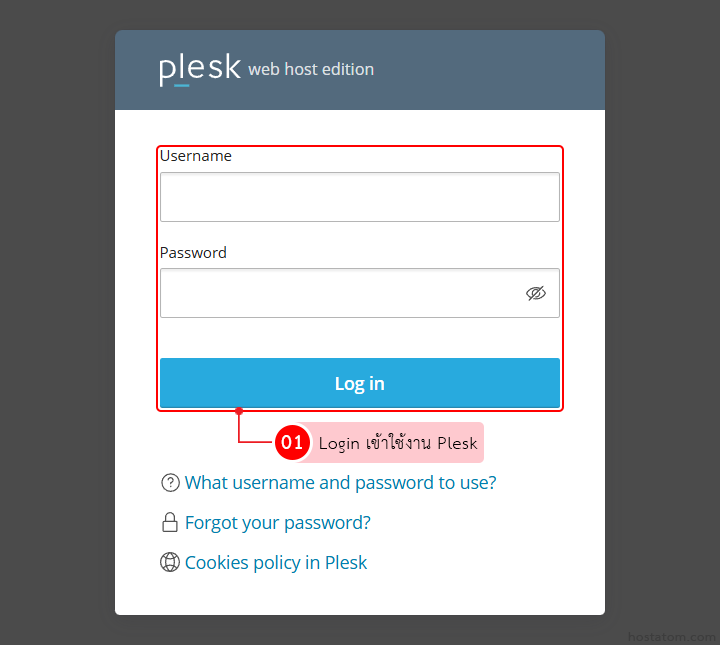
เริ่มจาก Login เข้าใช้งาน Plesk ด้วยบัญชีผู้ดูแลระบบ
Plesk web hosting login panel with Username and Password fields and a blue Log in button, plus help links below (What username and password to use?, Forgot your password?, Cookies policy in Plesk).

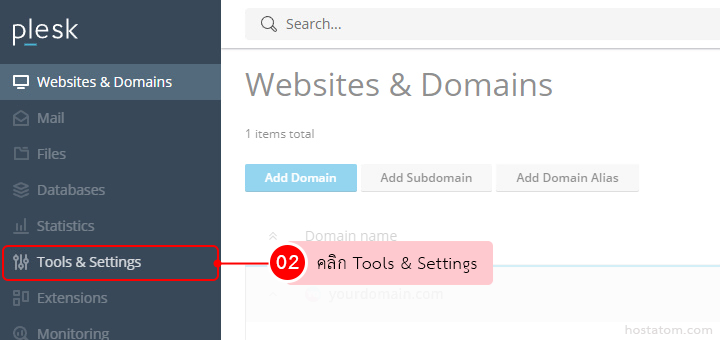
ที่เมนูด้านซ้าย คลิก Tools & Settings

Plesk interface: left menu with Tools & Settings highlighted, main area shows Websites & Domains with action buttons like Add Domain.

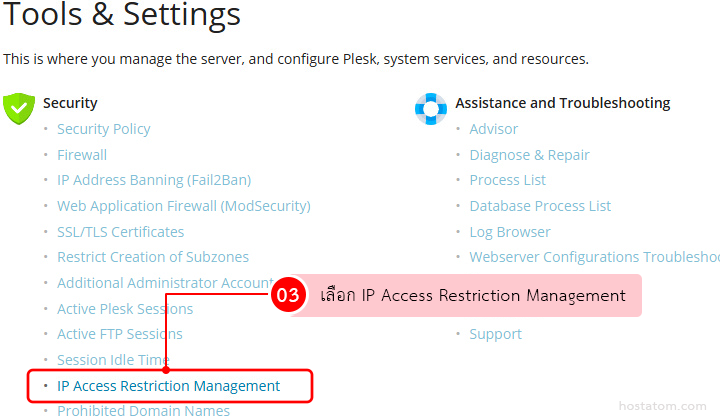
ในหัวข้อ Security คลิก IP Access Restriction Management

Screenshot of the Plesk Tools & Settings page showing two columns (Security; Assistance and Troubleshooting) with 'IP Access Restriction Management' highlighted and selected.

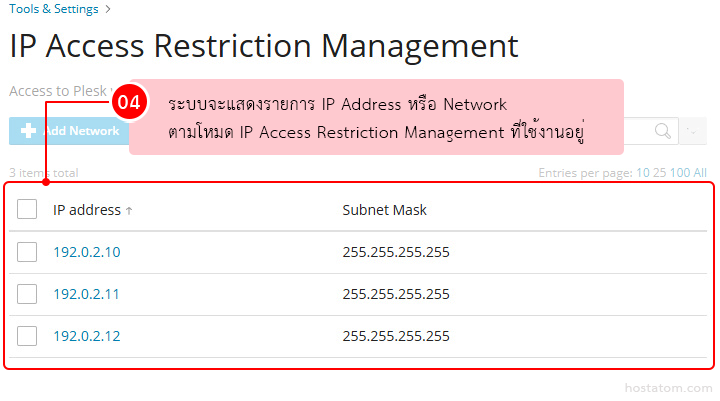
ระบบจะแสดงรายการ IP Address หรือ Network ตามโหมด IP Access Restriction Management ที่ใช้งานอยู่

IP Access Restriction Management page showing a table of IPs: 192.0.2.10, 192.0.2.11, 192.0.2.12 with 255.255.255.255 subnet masks and selection checkboxes on the left

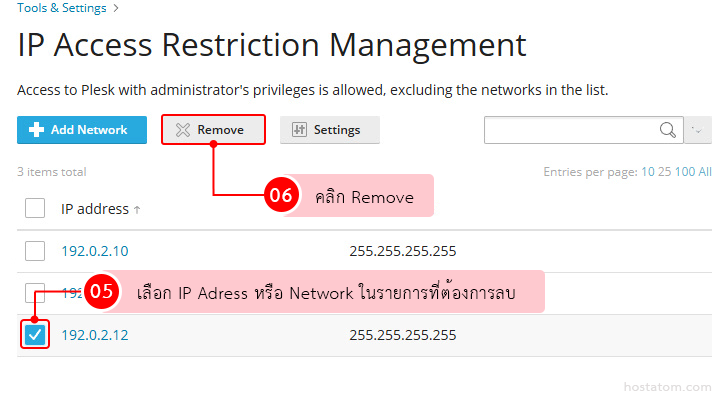
เลือก IP Address หรือ Network ที่ต้องการลบออกจากรายการ คลิก Remove

IP Access Restriction Management panel with Add, Remove, and Settings; 192.0.2.12 selected for removal.

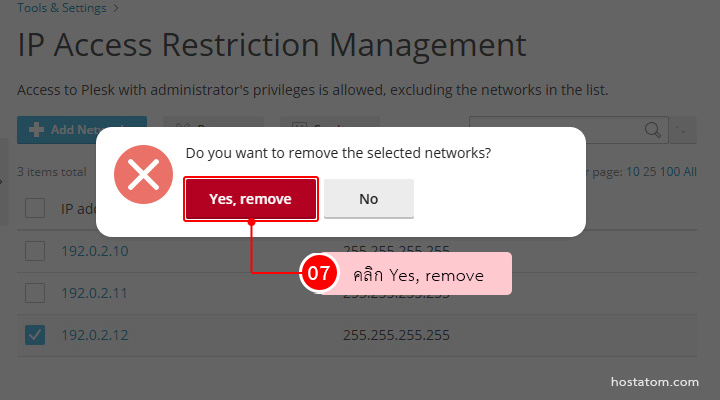
ระบบจะแสดงหน้าต่างยืนยันการลบรายการ คลิก Yes, remove

Confirmation dialog asking to remove the selected networks, with Yes, remove as the primary action and No to cancel.

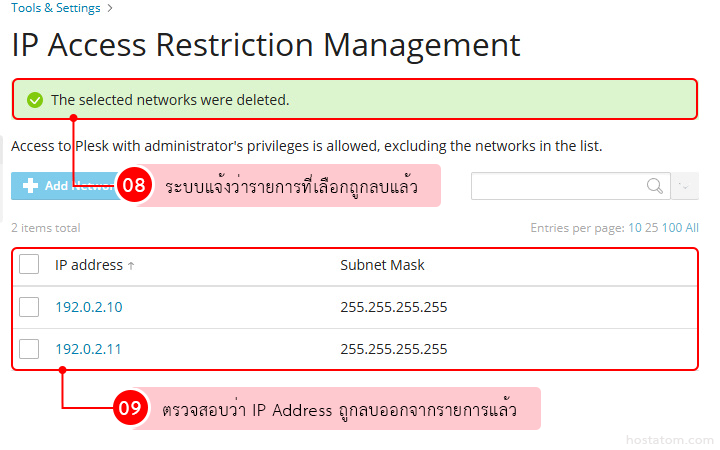
ระบบจะแจ้งว่ารายการที่เลือกถูกลบแล้ว และตรวจสอบอีกครั้งว่า IP Address หรือ Network ดังกล่าวไม่แสดงอยู่ในตารางแล้ว

IP Access Restriction Management page with a green success banner and a table showing the remaining IP Address or Network entries after the selected item has been removed.