
Google Calendar มีฟีเจอร์ Events from Gmail สำหรับนำข้อมูลจาก อีเมลยืนยันการจองหรือกิจกรรมบางประเภท ใน Gmail เช่น การเดินทาง การจองโรงแรม การจองร้านอาหาร หรือกิจกรรมที่มีการลงทะเบียน มาแสดงใน Calendar โดยอัตโนมัติ ทั้งนี้การแสดงกิจกรรมขึ้นอยู่กับประเภทและรูปแบบอีเมลที่ Google รองรับ โดยสามารถตั้งค่าได้ตามขั้นตอนต่อไปนี้
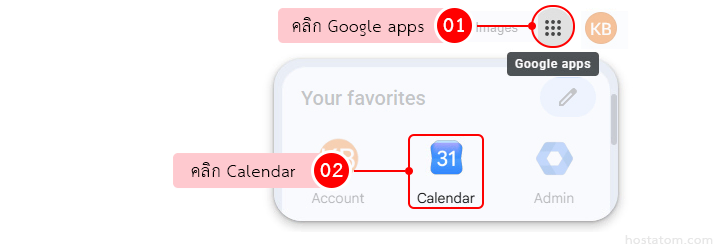
ลงชื่อเข้าใช้บัญชี Google จากนั้นคลิกไอคอน Google apps แล้วเลือก Calendar หรือเข้าใช้งานผ่าน calendar.google.com
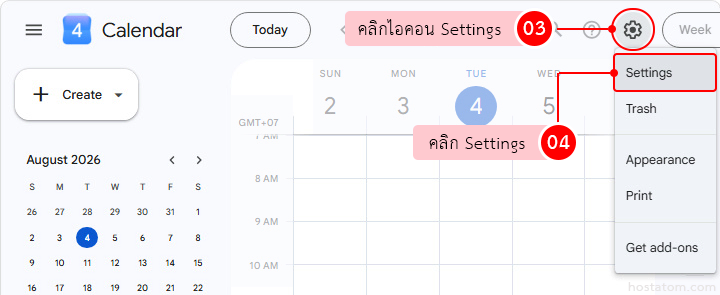
คลิกไอคอน Settings รูปเฟืองบริเวณด้านขวาบน แล้วเลือก Settings
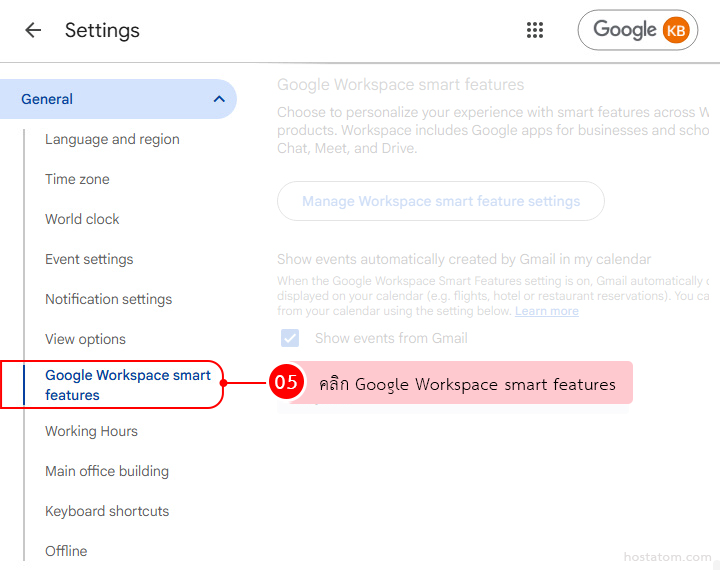
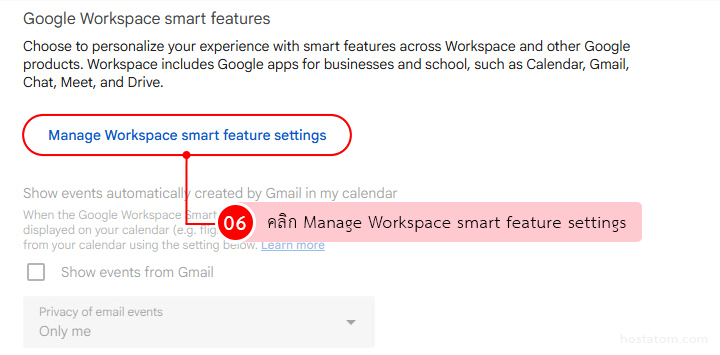
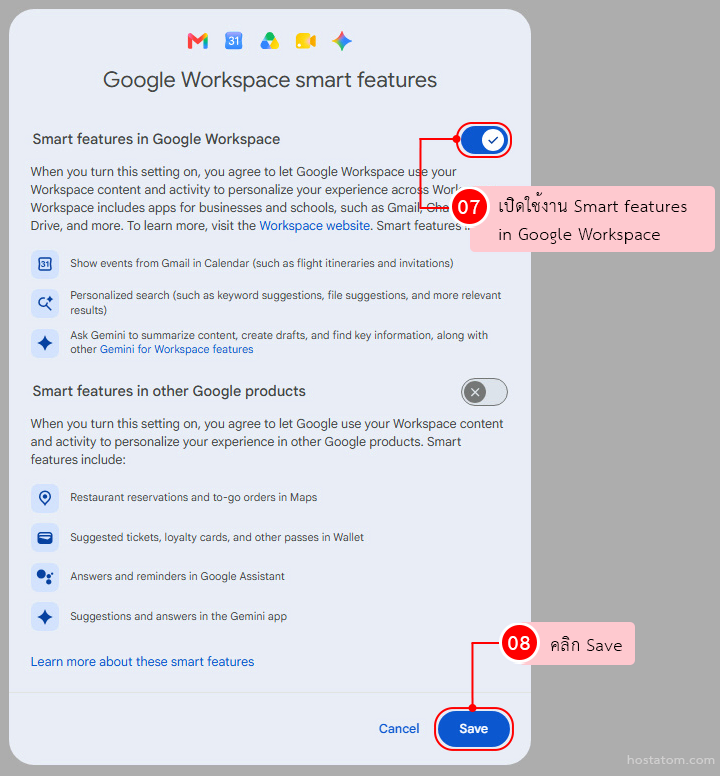
คลิก Manage Workspace smart feature settings
เปิดใช้งาน Smart features in Google Workspace แล้วคลิก คลิก Save
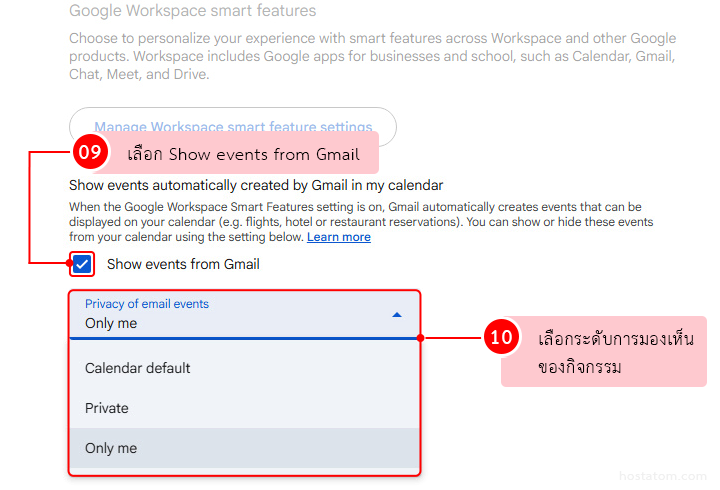
ตั้งค่าการแสดงกิจกรรมจาก Gmail และกำหนดความเป็นส่วนตัวของกิจกรรมตามต้องการ
- เลือก Show events from Gmail เพื่อเปิดใช้งานการแสดงกิจกรรมจาก Gmail ใน Google Calendar
- ที่หัวข้อ Privacy of email events เลือกระดับการมองเห็นของกิจกรรม
- Calendar default: ผู้ที่เข้าถึง Calendar ได้จะเห็นชื่อกิจกรรมและเวลา ส่วนผู้ที่มีสิทธิ์แก้ไขจะเห็นรายละเอียดเพิ่มเติมได้
- Private: คุณและผู้ที่มีสิทธิ์แก้ไข Calendar สามารถดูรายละเอียดกิจกรรมได้ ส่วนผู้ที่มีสิทธิ์ดูอย่างเดียวจะเห็นช่วงเวลานั้นเป็น
Busy - Only me: กิจกรรมจาก Gmail จะแสดงให้เห็นเฉพาะคุณเท่านั้น
เพียงเท่านี้ Google Calendar จะเปิดใช้งานฟีเจอร์ Events from Gmail และสามารถนำข้อมูลจาก อีเมลยืนยันการจองหรือกิจกรรมที่รองรับ มาแสดงเป็นกิจกรรมใน Calendar ได้
- การเปิด Show events from Gmail ไม่ได้หมายความว่าอีเมลทุกฉบับจะถูกนำมาสร้างเป็นกิจกรรมใน Google Calendar
- การแสดงกิจกรรมขึ้นอยู่กับประเภท รูปแบบ และข้อมูลในอีเมลที่ Google รองรับ
- อีเมลบางกรณี เช่น อีเมลที่ได้รับผ่าน Mailing List, ผู้รับถูก CC หรืออีเมลที่ Redirect มาจากบัญชีอื่น อาจไม่ถูกนำมาสร้างเป็นกิจกรรม
- ฟีเจอร์นี้ไม่รองรับบัญชีบางประเภท เช่น Government accounts, บัญชี Google Workspace ที่มีข้อจำกัดด้านตำแหน่งข้อมูล และบัญชี Google ที่ไม่มี Gmail
- หากไม่ต้องการใช้ฟีเจอร์นี้ สามารถกลับมาที่ Settings > General > Google Workspace smart features แล้วปิด Show events from Gmail ได้
อยากให้ทีมวางแผนเวลาและนัดหมายร่วมกันได้ง่ายขึ้น? Google Workspace รวม Google Calendar และเครื่องมือสำหรับการทำงานร่วมกันไว้ในที่เดียว ช่วยให้การจัดตารางงานเป็นระบบยิ่งขึ้น