ชั้น 29 ออฟฟิศเศส แอท เซ็นทรัลเวิลด์

999/9 พระราม 1 กรุงเทพฯ 10330

บริการตลอด 24 ชั่วโมง

ทุกวัน ไม่เว้นวันหยุด

0-2107-3466

โทรเลยดิจะรออะไร

Home DirectAdmin วิธีเปลี่ยน PHP Version ให้กับ subdomain ใน DirectAdmin

วิธีเปลี่ยน PHP Version ให้กับ subdomain ใน DirectAdmin

เว็บไซต์แต่ละเว็บอาจมีการรองรับ PHP Version ที่ไม่เหมือนกัน โดยการเลือกใช้เวอร์ชันที่เหมาะสมจะช่วยให้เว็บไซต์ทำงานได้อย่างถูกต้อง มีประสิทธิภาพ และปลอดภัยมากยิ่งขึ้น ซึ่งใน DirectAdmin สามารถเลือกเปลี่ยน PHP Version แยกแต่ละ Subdomain ได้ตามขั้นตอนต่อไปนี้

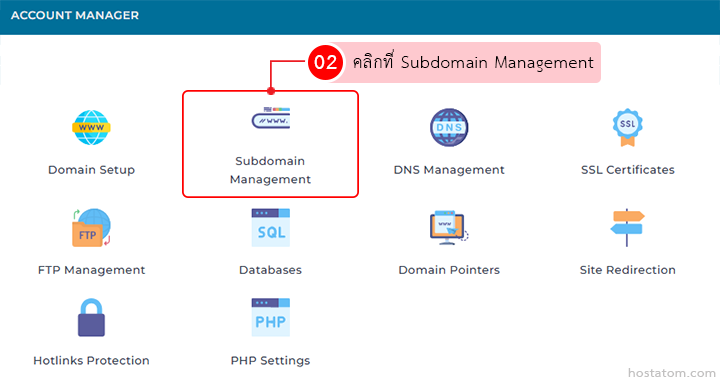
คลิกที่ Subdomain Management ในหมวด ACCOUNT MANAGER

Account Manager dashboard; Subdomain Management tile is highlighted (02). Other options shown include Domain Setup, DNS Management, SSL Certificates, FTP, Databases, Domain Pointers, Site Redirection, Hotlinks Protection, and PHP Settings.

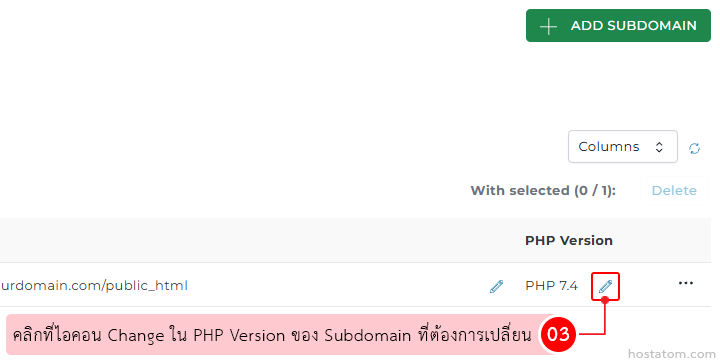
คลิกที่ไอคอน Change ใน PHP Version ของ Subdomain ที่ต้องการเปลี่ยน

Hosting control panel: subdomain PHP Version row with the edit icon highlighted and Thai tip about changing the version.

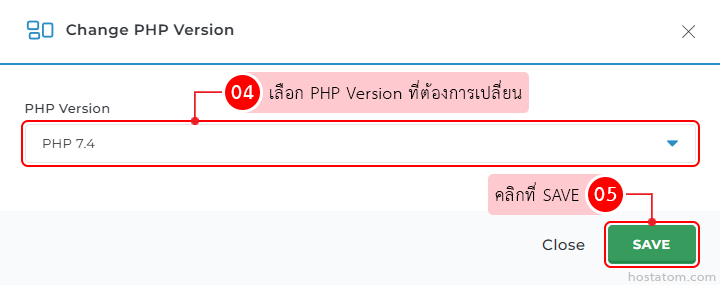
เลือก PHP Version ที่ต้องการเปลี่ยนในเมนู PHP Version จากนั้นคลิกที่ SAVE

Change PHP Version dialog showing PHP 7.4 selected in the dropdown and a green Save button (Close option nearby).

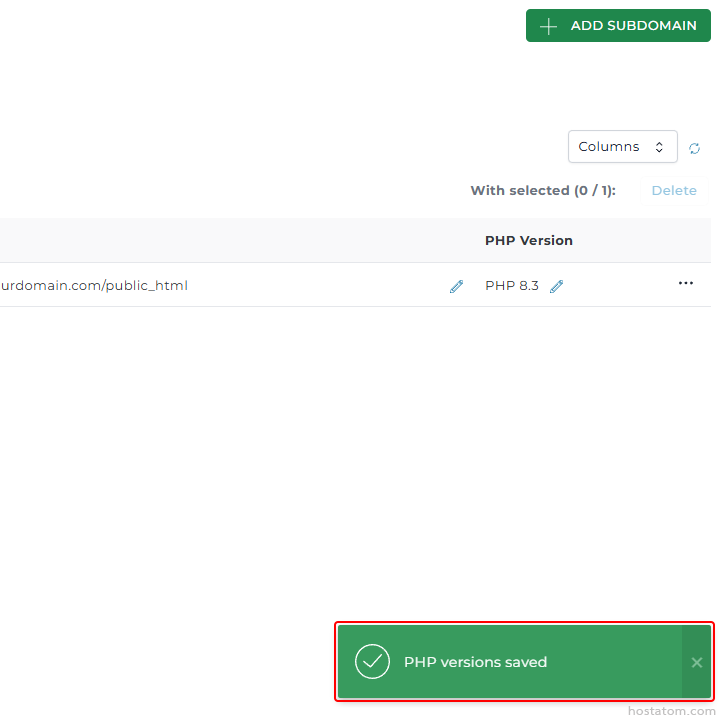
ระบบจะแจ้งว่าได้เปลี่ยน PHP Version ของ Subdomain ดังกล่าวแล้ว
Admin panel UI showing a subdomain mapping with a PHP version. The top-right has an green 'Add Subdomain' button; a table row lists 'urdo main.com/public_html' and 'PHP Version 8.3' with edit icons. A green toast at the bottom confirms 'PHP versions saved' with a checkmark.

หากคุณกำลังมองหาเว็บโฮสติ้งที่ใช้งานง่ายและปลอดภัย สามารถดูรายละเอียดแพ็กเกจ Web Hosting ของเราได้ที่
👉 https://www.hostatom.com/web-hosting