จำนวนครั้งที่วิดีโอถูกเปิดดูใน Google Drive สามารถตรวจสอบที่หัวข้อ Analytics ในแถบ Details ของไฟล์ โดยระบบจะแสดงค่า opens เพื่อช่วยให้ทราบว่าไฟล์วิดีโอมีการเปิดดูมากน้อยเพียงใด และใช้ดูภาพรวมความสนใจของผู้ที่เข้าถึงไฟล์ได้ สามารถตรวจสอบได้ทั้งจากหน้า Google Drive และหน้า Preview ของวิดีโอ โดยทำตามขั้นตอนต่อไปนี้
กรณีดูจากหน้า Google Drive
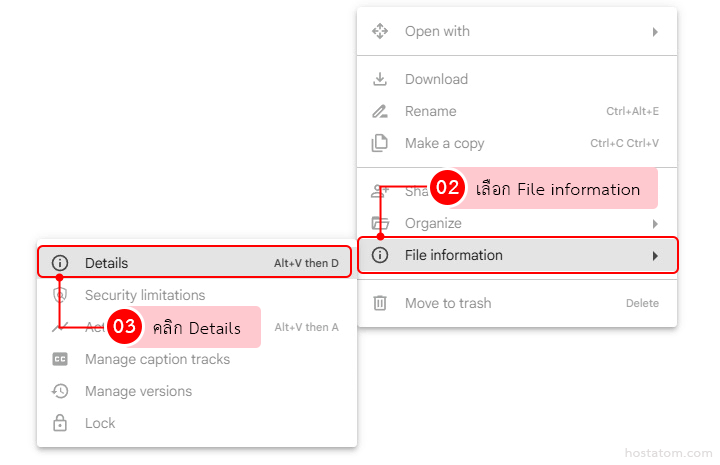
เข้าสู่ระบบ Google Drive แล้วไปยังไฟล์วิดีโอที่ต้องการตรวจสอบ จากนั้น คลิกไอคอนจุดสามจุด ( ⋮ ) หรือคลิกขวาที่ไฟล์
เลือกเมนู File information จากนั้น คลิก Details
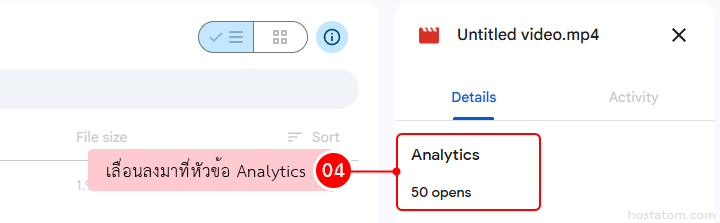
ระบบจะแสดงแถบทางด้านขวา ที่แท็บ Details ให้ เลื่อนลงมาที่หัวข้อ Analytics เพื่อตรวจสอบจำนวนครั้งที่วิดีโอถูกเปิดดูจากค่า opens
กรณีดูจากหน้า Preview ของวิดีโอ
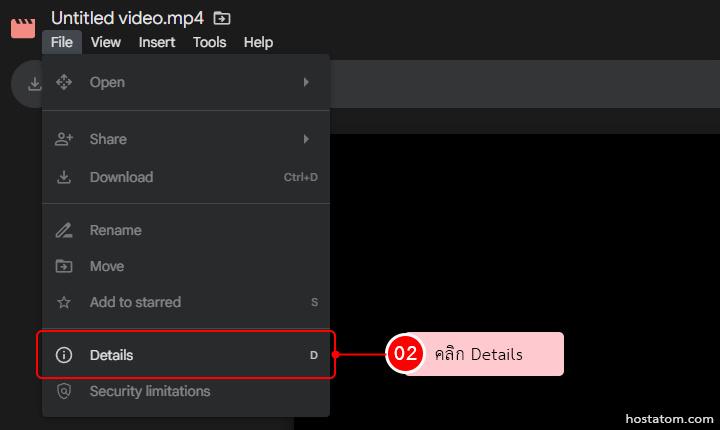
เปิดไฟล์วิดีโอขึ้นมาเพื่อเข้าสู่หน้า Preview จากนั้นคลิกเมนู File ที่มุมซ้ายบนของหน้าต่างแสดงวิดีโอ
จากนั้นเลือกเมนู Details เพื่อเปิดแถบรายละเอียดของไฟล์
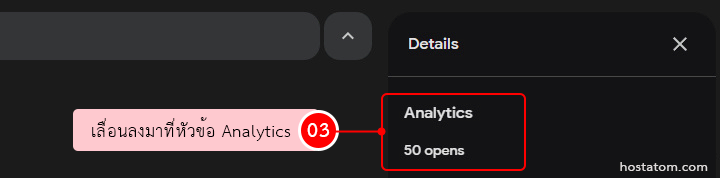
ระบบจะแสดงแถบ Details ทางด้านขวาของหน้า Preview ให้เลื่อนลงมาที่หัวข้อ Analytics เพื่อดูจำนวน opens ของวิดีโอ
อยากแชร์วิดีโอและติดตามการเปิดดูไฟล์ได้อย่างเป็นระบบ?
Google Workspace ช่วยให้ทีมจัดเก็บ แชร์ และทำงานร่วมกันผ่าน Google Drive ได้อย่างคล่องตัว
ดูรายละเอียด Google Workspace