ชั้น 29 ออฟฟิศเศส แอท เซ็นทรัลเวิลด์

999/9 พระราม 1 กรุงเทพฯ 10330

บริการตลอด 24 ชั่วโมง

ทุกวัน ไม่เว้นวันหยุด

0-2107-3466

โทรเลยดิจะรออะไร

Home DirectAdmin DirectAdmin User Level วิธีลบ MIME type ใน DirectAdmin

วิธีลบ MIME type ใน DirectAdmin

หลังจากที่เพิ่ม MIME Type เพื่อให้เว็บเซิร์ฟเวอร์รู้จักและรองรับการใช้งานไฟล์ประเภทใหม่บนเว็บไซต์ แต่หาก MIME Type ดังกล่าวไม่จำเป็นต้องใช้งานแล้ว ก็สามารถลบออกเพื่อลดความซับซ้อนในการตั้งค่าจาก DirectAdmin ได้ตามขั้นตอนต่อไปนี้

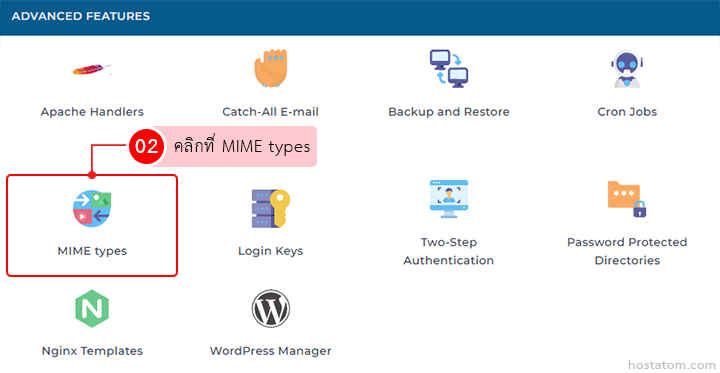
คลิกที่ MIME types ในหมวด ADVANCED FEATURES

Grid of advanced hosting features with the MIME types card highlighted in red

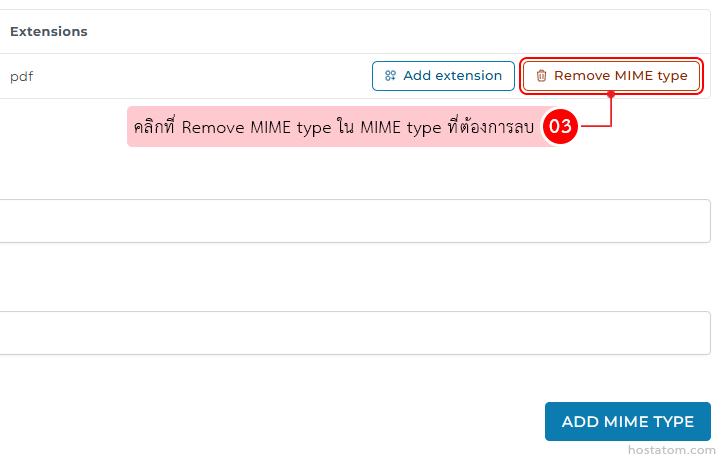
คลิกที่ Remove MIME type ใน MIME type ที่ต้องการลบ

Extensions panel showing a pdf MIME type with buttons 'Add extension' and 'Remove MIME type'; a pink tooltip instructs to click Remove MIME type to remove the MIME type.

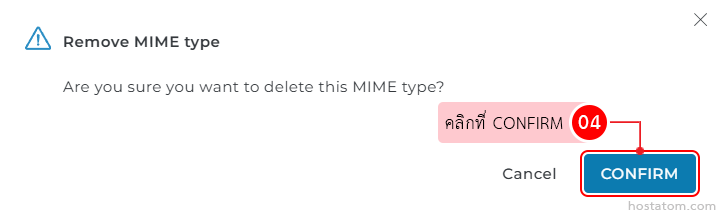
ระบบจะแสดงหน้าต่างยืนยันการลบ MIME type ดังกล่าวขึ้นมา ให้คลิกที่ CONFIRM

Confirmation dialog for deleting a MIME type: warning icon, title 'Remove MIME type', question asking for confirmation, Thai instruction bubble pointing to the blue CONFIRM button, with a Cancel option.

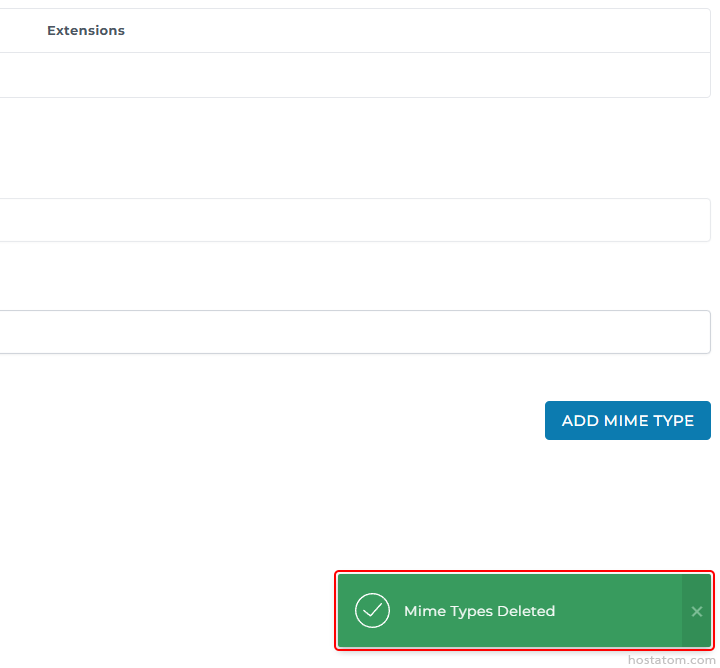
ระบบจะแจ้งว่าได้ลบ MIME type ดังกล่าวแล้ว
Admin UI for MIME types: three input fields and an 'Add MIME Type' button; green success toast 'Mime Types Deleted' at bottom.

หากคุณกำลังมองหาเว็บโฮสติ้งที่ใช้งานง่ายและปลอดภัย สามารถดูรายละเอียดแพ็กเกจ Web Hosting ของเราได้ที่
👉 https://www.hostatom.com/web-hosting