ชั้น 29 ออฟฟิศเศส แอท เซ็นทรัลเวิลด์

999/9 พระราม 1 กรุงเทพฯ 10330

บริการตลอด 24 ชั่วโมง

ทุกวัน ไม่เว้นวันหยุด

0-2107-3466

โทรเลยดิจะรออะไร

Home DirectAdmin DirectAdmin User Level วิธีลบ Subdomain ใน DirectAdmin

วิธีลบ Subdomain ใน DirectAdmin

หลังจากที่ใช้งาน Subdomain ไปสักระยะ หากมี Subdomain ที่ไม่ได้ใช้งานแล้ว การลบ Subdomain เหล่านั้นออก นอกจากจะช่วยให้การจัดการเว็บไซต์เป็นระเบียบมากขึ้นแล้ว ยังช่วยลดความสับสนในการดูแลโดเมน และช่วยให้ตรวจสอบรายการ Subdomain ที่ใช้งานอยู่ได้ง่ายขึ้นอีกด้วย โดยใน DirectAdmin สามารถทำได้ตามขั้นตอนต่อไปนี้

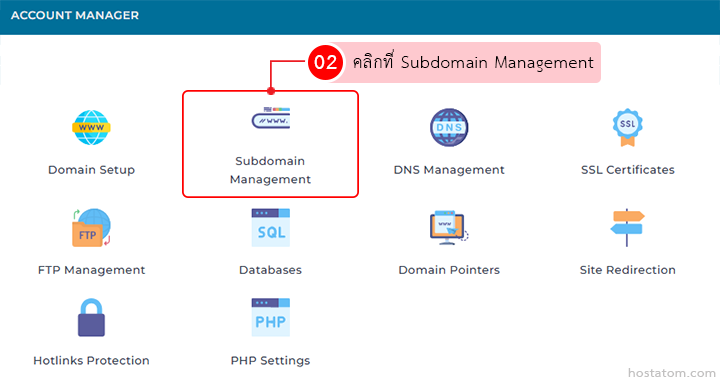
คลิกที่ Subdomain Management ในหมวด ACCOUNT MANAGER

Account Manager dashboard; Subdomain Management tile is highlighted (02). Other options shown include Domain Setup, DNS Management, SSL Certificates, FTP, Databases, Domain Pointers, Site Redirection, Hotlinks Protection, and PHP Settings.

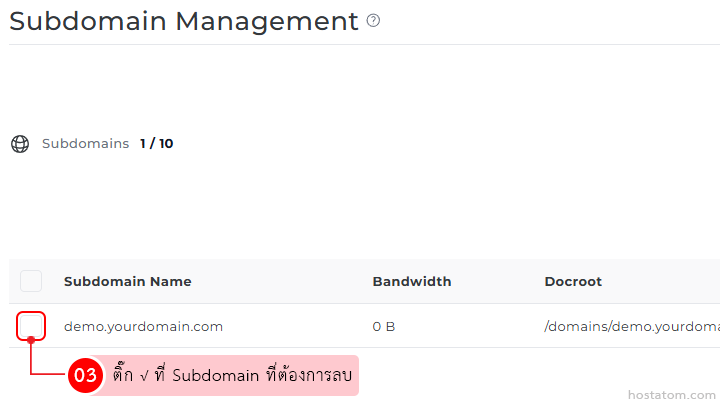
ติ๊ก √ ที่ Subdomain ที่ต้องการลบ

Subdomain Management screen showing a table with Subdomain Name, Bandwidth, and Docroot; a checkbox beside demo.yourdomain.com for deletion, with a Thai instruction tooltip.

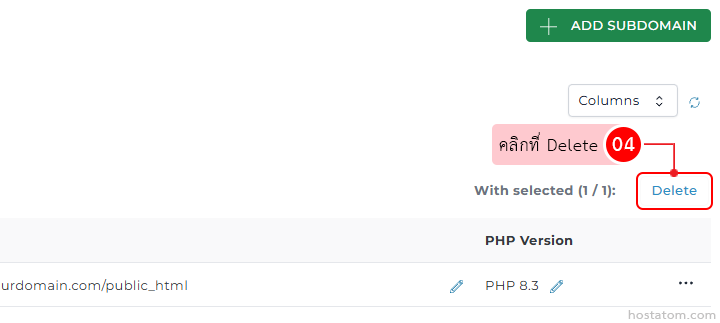
คลิกที่ Delete

Web admin panel showing a Delete button for the selected subdomain in the subdomain management area, with an Add Subdomain button nearby.

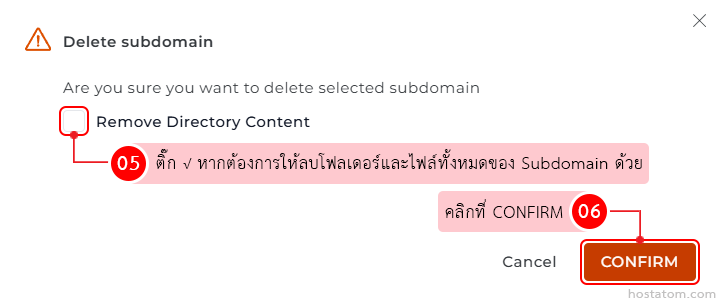
ระบบจะแสดงหน้าต่างยืนยันการลบ Subdomain ที่เลือกขึ้นมา โดยหากต้องการให้ลบโฟลเดอร์และไฟล์ทั้งหมดของ Subdomain นั้นด้วย ให้ติ๊ก √ ที่ Remove Directory Content จากนั้นคลิกที่ CONFIRM

Dialog titled 'Delete subdomain' with a step-by-step flow: step 05 to include removing directory content, step 06 to click CONFIRM, and Cancel/CONFIRM buttons visible.

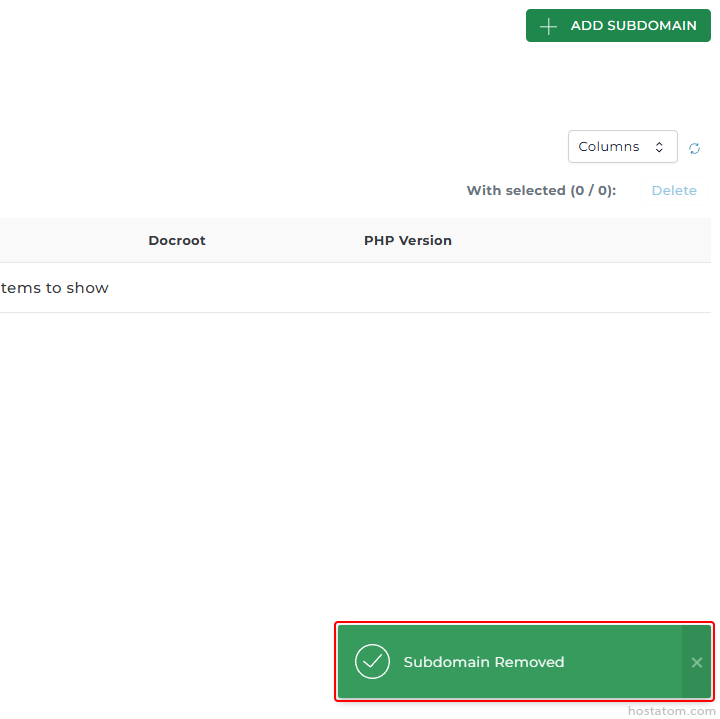
ระบบจะแจ้งว่าได้ลบ Subdomain ดังกล่าวแล้ว
Web admin panel showing a green notification banner reading 'Subdomain Removed' at the bottom right.

หากคุณกำลังมองหาเว็บโฮสติ้งที่ใช้งานง่ายและปลอดภัย สามารถดูรายละเอียดแพ็กเกจ Web Hosting ของเราได้ที่
👉 https://www.hostatom.com/web-hosting