ชั้น 29 ออฟฟิศเศส แอท เซ็นทรัลเวิลด์

999/9 พระราม 1 กรุงเทพฯ 10330

บริการตลอด 24 ชั่วโมง

ทุกวัน ไม่เว้นวันหยุด

0-2107-3466

โทรเลยดิจะรออะไร

knowledge base › DirectAdmin › DirectAdmin User Level › วิธีเปิด/ปิดการคำนวณขนาดโฟลเดอร์อัตโนมัติใน File Manager ของ DirectAdmin

วิธีเปิด/ปิดการคำนวณขนาดโฟลเดอร์อัตโนมัติใน File Manager ของ DirectAdmin

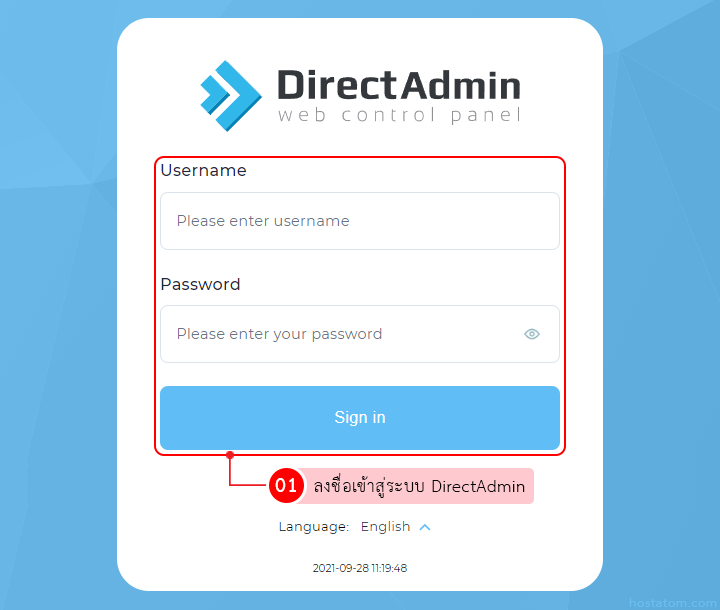
โดยปกติแล้ว File Manager ใน DirectAdmin สามารถคำนวณและแสดงขนาดของโฟลเดอร์ต่าง ๆ เพื่อตรวจสอบว่าแต่ละโฟลเดอร์ใช้พื้นที่ไปเท่าไร แต่ถ้าต้องการให้ระบบคำนวณขนาดโฟลเดอร์ทุกครั้งที่เข้าใช้งาน File Manager สามารถตั้งค่าได้ง่าย ๆ ตามขั้นตอนต่อไปนี้

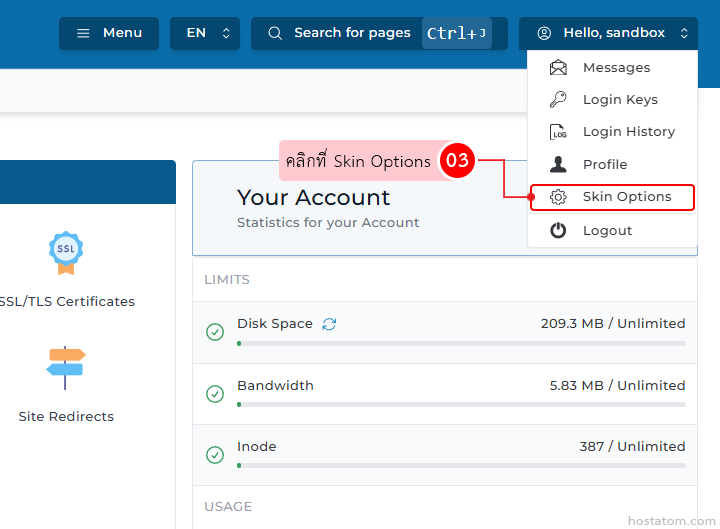
คลิกที่ Hello, (ชื่อผู้ใช้) ที่มุมขวา

Account dashboard showing a right-side dropdown menu; 'Skin Options' is highlighted with a pink tooltip pointing to it.

คลิกที่ Skin Options

Web app account page; a dropdown menu is open with 'Skin Options' highlighted; tooltip bubble and left navigation icons visible; 'Your Account' panel shows usage statistics.

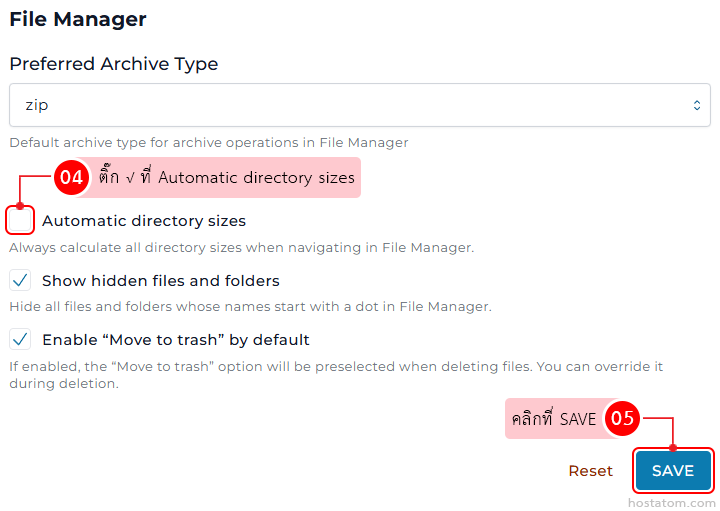
กรณีที่เปิดการคำนวณขนาดโฟลเดอร์อัตโนมัติ

ติ๊ก √ ที่ Automatic directory sizes ในหมวด File Manager จากนั้นคลิกที่ SAVE

File Manager settings panel with ZIP selected as default archive type and options for showing hidden files, moving deleted items to trash, and a Save button.

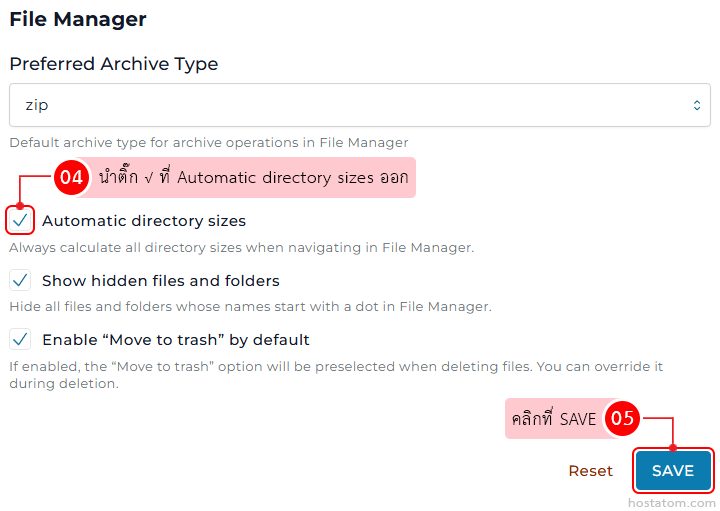
กรณีที่ปิดการคำนวณขนาดโฟลเดอร์อัตโนมัติ

นำติ๊ก √ ที่ Automatic directory sizes ในหมวด File Manager ออก จากนั้นคลิกที่ SAVE
Screenshot of File Manager settings: Preferred Archive Type set to zip; Automatic directory sizes enabled; Show hidden files and folders enabled; Enable 'Move to trash' by default enabled; Save button highlighted.

หากคุณกำลังมองหาเว็บโฮสติ้งที่ใช้งานง่ายและปลอดภัย สามารถดูรายละเอียดแพ็กเกจ Web Hosting ของเราได้ที่
👉 https://www.hostatom.com/web-hosting