ชั้น 29 ออฟฟิศเศส แอท เซ็นทรัลเวิลด์

999/9 พระราม 1 กรุงเทพฯ 10330

บริการตลอด 24 ชั่วโมง

ทุกวัน ไม่เว้นวันหยุด

0-2107-3466

โทรเลยดิจะรออะไร

knowledge base › DirectAdmin › DirectAdmin User Level › วิธีเปิด/ปิดการแสดงไฟล์และโฟลเดอร์ที่ซ่อนอยู่ใน File Manager ของ DirectAdmin

วิธีเปิด/ปิดการแสดงไฟล์และโฟลเดอร์ที่ซ่อนอยู่ใน File Manager ของ DirectAdmin

เมื่อต้องจัดการไฟล์เว็บไซต์ผ่าน File Manager ใน DirectAdmin บางครั้งอาจต้องเข้าถึงไฟล์ที่มีชื่อขึ้นต้นด้วยจุด (.) เช่น .htaccess หรือ .well-known ซึ่งมักเป็นไฟล์ที่เกี่ยวข้องกับการตั้งค่าของเว็บไซต์ โดยสามารถกำหนดว่าจะให้แสดงหรือซ่อนไฟล์เหล่านี้ตามความเหมาะสมได้ตามขั้นตอนต่อไปนี้

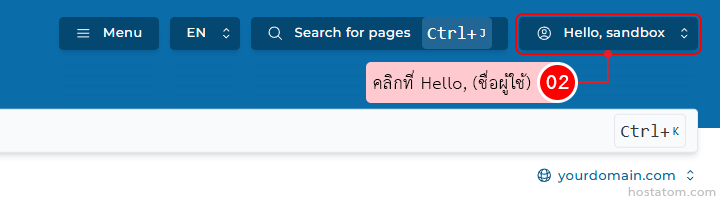
คลิกที่ Hello, (ชื่อผู้ใช้) ที่มุมขวา

Site header with Menu button, language selector, search bar, and user menu showing 'Hello, sandbox' with a tooltip/pointer.

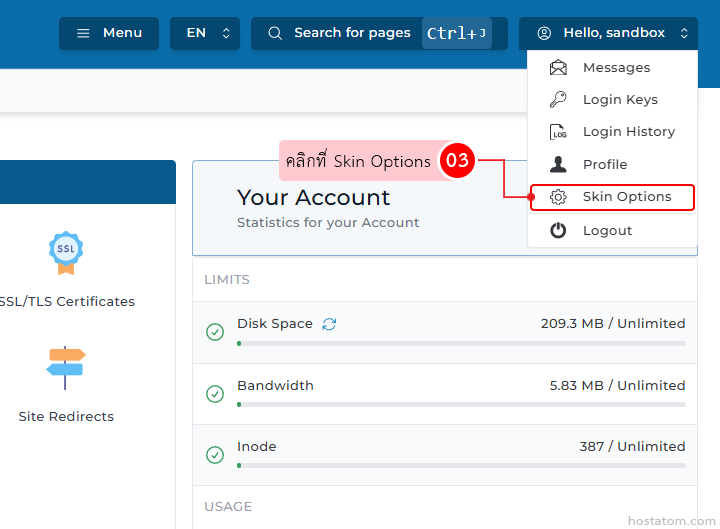
คลิกที่ Skin Options

Web app account page; a dropdown menu is open with 'Skin Options' highlighted; tooltip bubble and left navigation icons visible; 'Your Account' panel shows usage statistics.

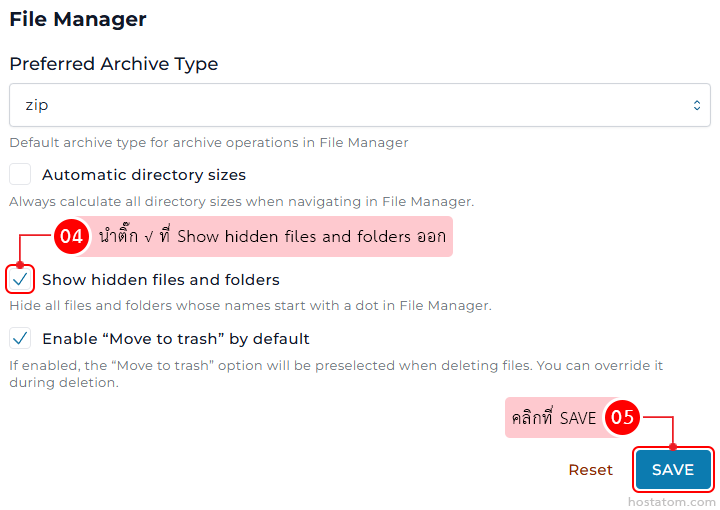
กรณีที่ปิดการแสดงไฟล์และโฟลเดอร์ที่ซ่อนอยู่

นำติ๊ก √ ที่ Show hidden files and folders ในหมวด File Manager ออก จากนั้นคลิกที่ SAVE

File Manager settings: default archive type ZIP, show hidden files, move to trash enabled; Save button highlighted.

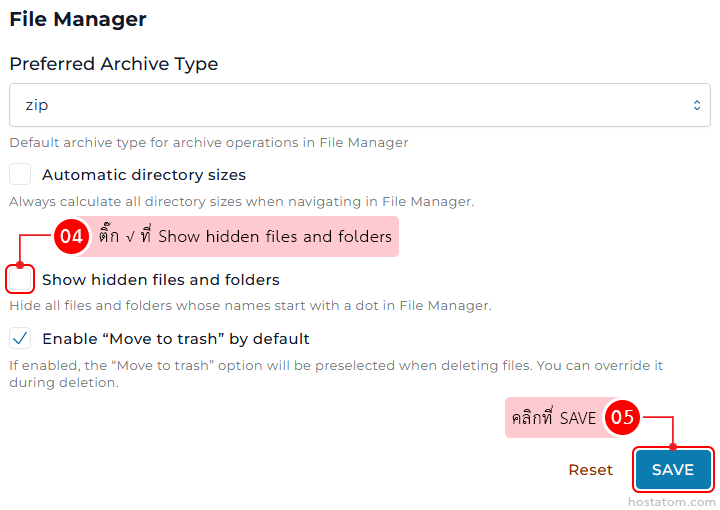
กรณีที่เปิดการแสดงไฟล์และโฟลเดอร์ที่ซ่อนอยู่

ติ๊ก √ ที่ Show hidden files and folders จากนั้นคลิกที่ SAVE
Screenshot of File Manager settings: Preferred archive type zip selected; options for automatic directory sizes, show hidden files, and move-to-trash by default; blue SAVE button visible.

หากคุณกำลังมองหาเว็บโฮสติ้งที่ใช้งานง่ายและปลอดภัย สามารถดูรายละเอียดแพ็กเกจ Web Hosting ของเราได้ที่
👉 https://www.hostatom.com/web-hosting