ชั้น 29 ออฟฟิศเศส แอท เซ็นทรัลเวิลด์

999/9 พระราม 1 กรุงเทพฯ 10330

บริการตลอด 24 ชั่วโมง

ทุกวัน ไม่เว้นวันหยุด

0-2107-3466

โทรเลยดิจะรออะไร

Home Google Search Console วิธีส่ง Sitemap ใน Google Search Console

วิธีส่ง Sitemap ใน Google Search Console

หากต้องการให้ Google ค้นพบหน้าเว็บไซต์ได้ง่ายขึ้น การส่ง Sitemap เป็นอีกหนึ่งวิธีที่ช่วยได้ โดย Sitemap คือไฟล์ที่ช่วยบอก Google ว่าเว็บไซต์มีหน้าเว็บ วิดีโอ หรือไฟล์สำคัญใดบ้าง แต่การส่ง Sitemap เป็นเพียงการแจ้ง URL ให้ Google ทราบ ไม่ได้รับประกันว่า Google จะ Crawl หรือ Index ทุกหน้าในทันที
โดยสามารถติดตั้ง Sitemap ใน Google Search Console ได้ตามขั้นตอนต่อไปนี้

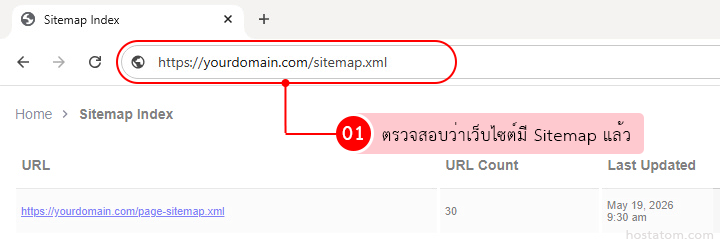
ตรวจสอบว่าเว็บไซต์มีไฟล์ Sitemap แล้ว โดยปกติแล้วมักจะอยู่ที่ https://yourdomain.com/sitemap.xml หรือ https://yourdomain.com/sitemap_index.xml

Screenshot of a browser showing the sitemap index at https://yourdomain.com/sitemap.xml, with a table of URLs, URL Count, and Last Updated.

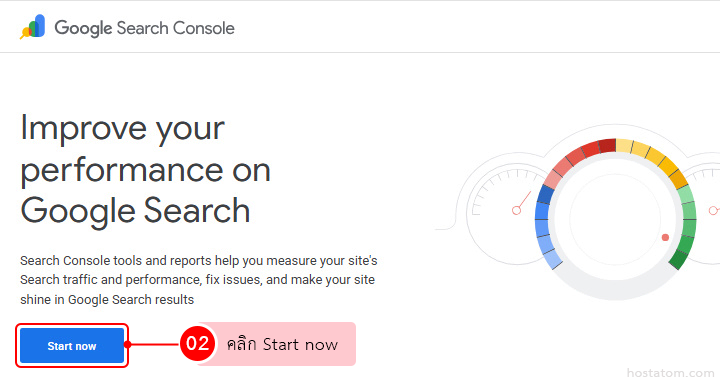
เข้าสู่ Google Search Console https://search.google.com/search-console

Google Search Console hero with the headline “Improve your performance on Google Search” and a prominent Start now button beside a circular gauge graphic.

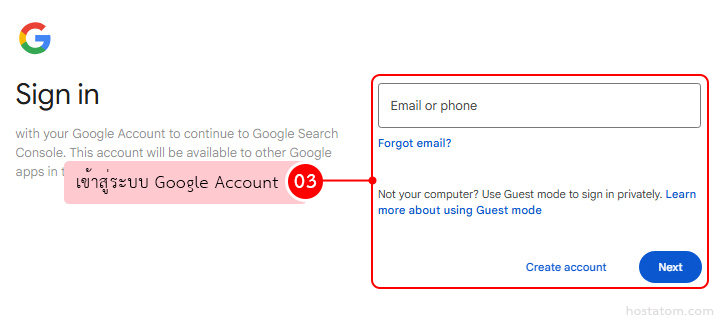
จากนั้นลงชื่อเข้าใช้ด้วยบัญชี Google ที่ใช้ดูแลเว็บไซต์

Google Sign in screen with an Email or phone input; pink Thai annotation 'เข้าสู่ระบบ Google Account' points to the sign-in panel, Next button visible.

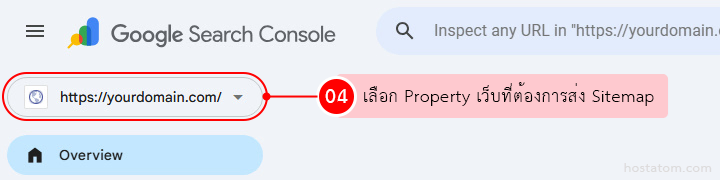
เลือก Property ของเว็บไซต์ที่ต้องการส่ง Sitemap

Google Search Console UI showing a domain property dropdown with https://yourdomain.com/ selected.

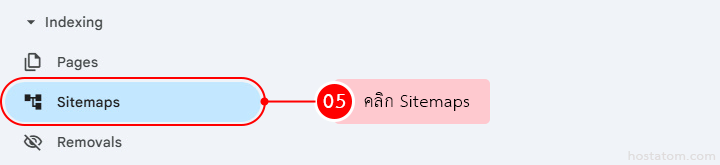
ที่เมนูด้านซ้าย หมวด Indexing คลิก Sitemaps

Google Search Console left sidebar with Sitemaps menu item highlighted under Indexing section

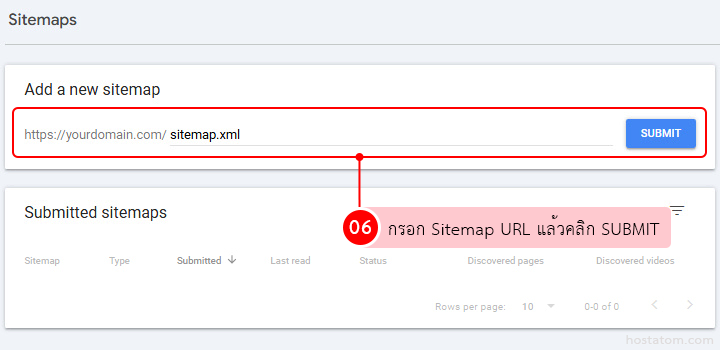
ในช่อง Add a new sitemap กรอก URL ของ Sitemap เช่น sitemap.xml หรือ sitemap_index.xml จากนั้นคลิก SUBMIT

Webmaster tool: input field to add a sitemap URL and a Submit button, with a Submitted sitemaps panel below.

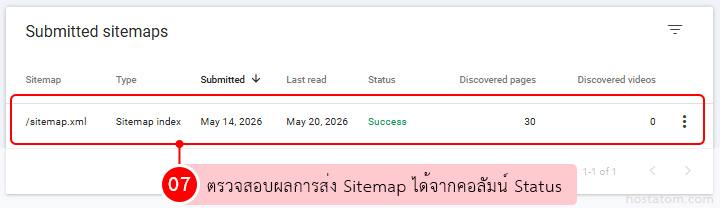
ตรวจสอบสถานะในส่วน Submitted sitemaps

  • Success: Google อ่าน Sitemap ได้สำเร็จ
  • Has errors: Google อ่าน Sitemap ได้ แต่พบข้อผิดพลาดบางรายการ
  • Couldn’t fetch: Google ไม่สามารถอ่านไฟล์ Sitemap ได้ ควรตรวจสอบ URL และการเข้าถึงไฟล์
Screenshot of the Submitted sitemaps page showing a row for /sitemap.xml as a Sitemap index; submitted May 14, 2026, last read May 20, 2026, status Success, 30 discovered pages and 0 discovered videos.

หลังจากส่ง Sitemap แล้ว Google อาจใช้เวลาตรวจสอบตั้งแต่ไม่กี่ชั่วโมงถึงหลายวัน แนะนำให้กลับมาตรวจสอบอีกครั้งภายใน 1–3 วัน