การเข้าถึงระบบหรือข้อมูลสำคัญขององค์กร หากยืนยันตัวตนเพียงครั้งเดียว อาจไม่เพียงพอต่อการรักษาความปลอดภัยในระยะยาว
Reauthentication เป็นฟีเจอร์ที่ช่วยเพิ่มความปลอดภัย โดยกำหนดให้ผู้ใช้งานยืนยันตัวตนซ้ำเป็นระยะ ๆ เช่น การกรอกรหัสผ่านใหม่ หรือใช้ Security Key ตามนโยบายขององค์กร เพื่อลดความเสี่ยงจากการเข้าถึงระบบโดยไม่ได้รับอนุญาต
- ต้องใช้บัญชีที่มีสิทธิ์ Super Admin
- ใช้สำหรับกำหนดนโยบาย Reauthentication ของ Google Cloud Console และ Google Cloud SDK
- การตั้งค่าอาจใช้เวลาสูงสุด 24 ชั่วโมง จึงจะมีผลกับผู้ใช้ทั้งหมด
ขั้นตอนการตั้งค่า Reauthentication
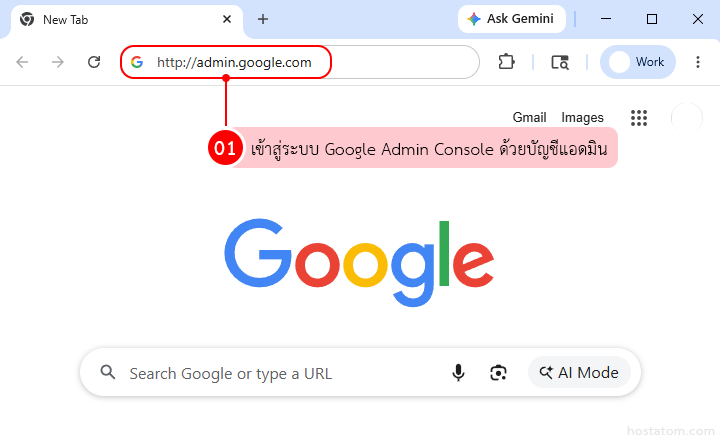
เข้าสู่ระบบ Google Admin Console ด้วยบัญชีแอดมิน
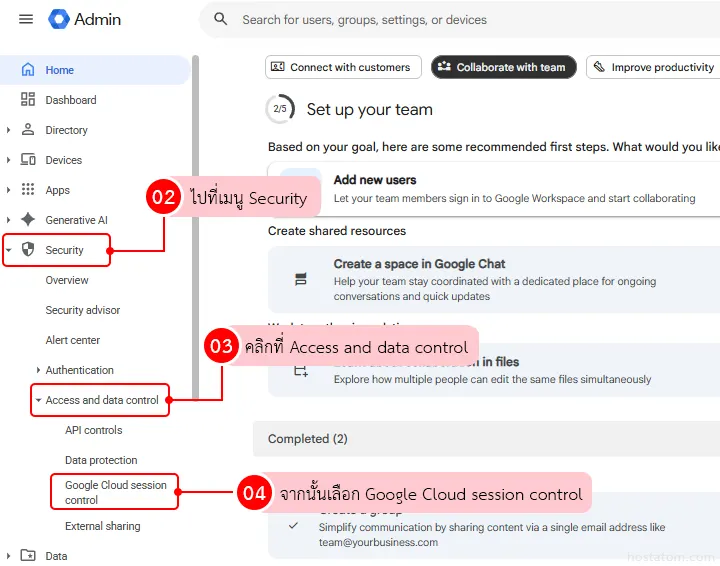
ไปที่เมนู Security > Access and data control > Google Cloud session control
เลือก Organizational Unit (OU) ที่ต้องการตั้งค่า
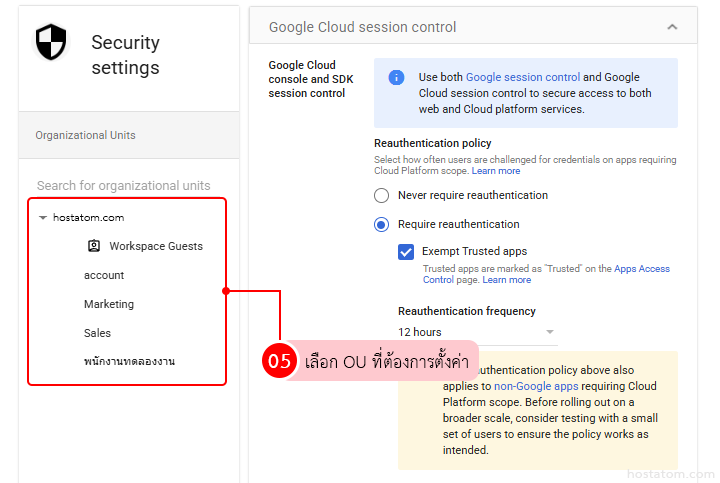
เปิดใช้งาน Require reauthentication ในหัวข้อ Reauthentication policy
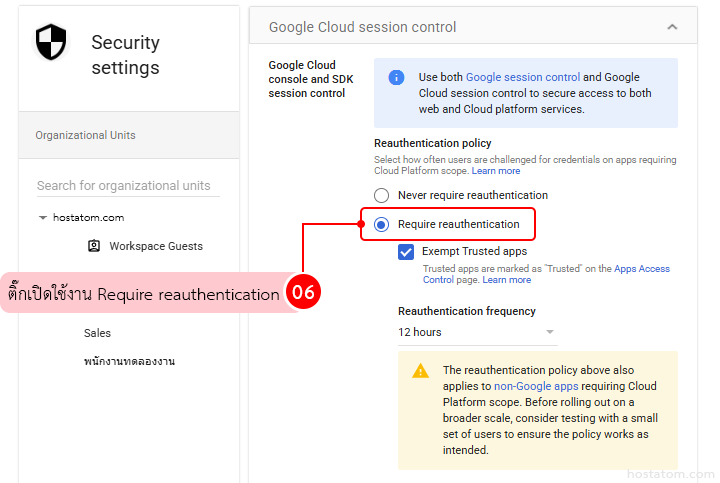
ตั้งค่ารายละเอียดเพิ่มเติมตามต้องการ ดังนี้
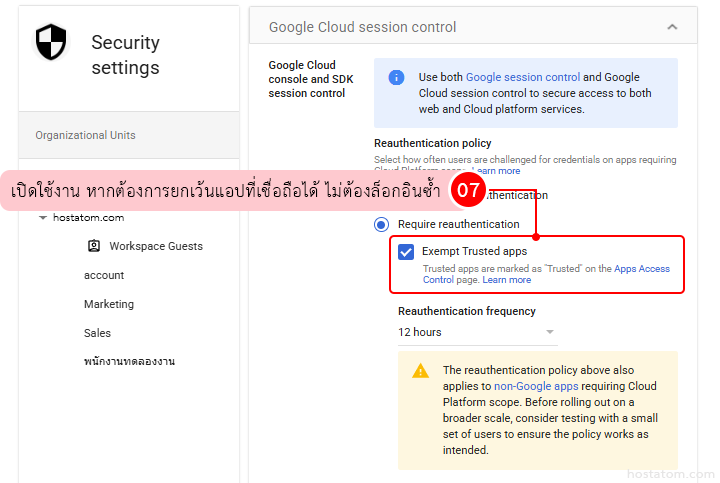
- เปิดใช้งาน Exempt trusted apps หากต้องการให้แอปที่เชื่อถือได้เข้าใช้งานได้โดยไม่ต้องยืนยันตัวตนซ้ำ
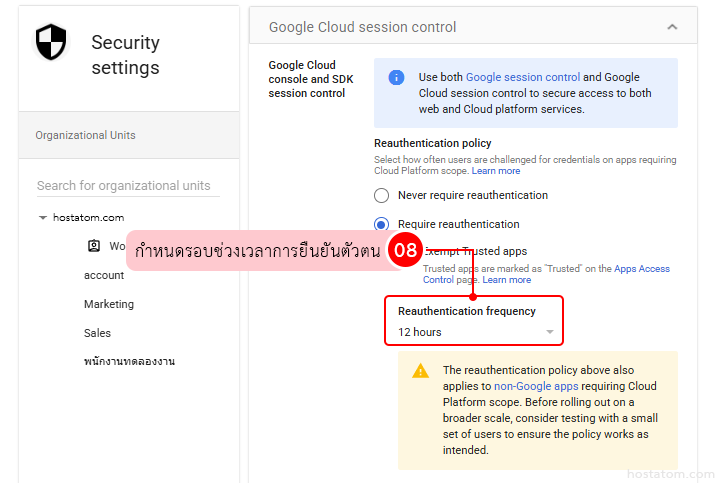
- กำหนดช่วงเวลาการยืนยันตัวตนใหม่ที่หัวข้อ Reauthentication frequency
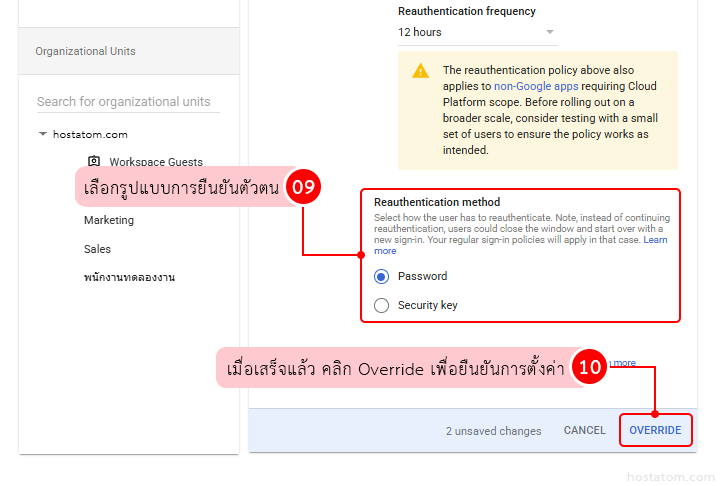
- เลือกรูปแบบการยืนยันตัวตนที่หัวข้อ Reauthentication method เช่น
- Password (รหัสผ่าน)
- Security key (กรณีที่องค์กรเปิดใช้งานแล้ว)
เมื่อกำหนดค่าทั้งหมดเรียบร้อยแล้ว คลิก Save/Override เพื่อบันทึกการตั้งค่า
- สำหรับบัญชีผู้ใช้งานทั่วไป แนะนำให้กำหนดความถี่ประมาณ ทุก 24 ชั่วโมง เพื่อไม่ให้กระทบการทำงานมากเกินไป
- สำหรับบัญชีที่เข้าถึงข้อมูลสำคัญ ควรกำหนดความถี่ให้สั้นลง เช่น ทุก 8–12 ชั่วโมง
- หากมีผู้ใช้งานที่ทำงานนอกสถานที่ ควรแจ้งให้ทราบล่วงหน้า เพื่อป้องกันความสับสนเมื่อระบบขอให้ยืนยันตัวตนใหม่
การเปิดใช้งาน Reauthentication ช่วยเพิ่มความปลอดภัยในการเข้าถึงระบบและข้อมูลสำคัญขององค์กร พร้อมลดความเสี่ยงจากการใช้งานบัญชีโดยไม่ได้รับอนุญาต โดยยังสามารถกำหนดนโยบายให้เหมาะกับลักษณะการทำงานของแต่ละองค์กรได้
หากต้องการตั้งค่าความปลอดภัย Google Workspace ให้เหมาะกับองค์กรของคุณมากยิ่งขึ้น
hostatom มีทีมผู้เชี่ยวชาญช่วยดูแล ตั้งค่า และให้คำแนะนำได้ครบในที่เดียว ช่วยให้ระบบพร้อมใช้งานอย่างมั่นใจตั้งแต่วันแรก