ชั้น 29 ออฟฟิศเศส แอท เซ็นทรัลเวิลด์

999/9 พระราม 1 กรุงเทพฯ 10330

บริการตลอด 24 ชั่วโมง

ทุกวัน ไม่เว้นวันหยุด

0-2107-3466

โทรเลยดิจะรออะไร

Home DirectAdmin User Level วิธีเพิ่มโดเมน/ประเภทไฟล์ที่จะทำ Hotlink Protection ใน DirectAdmin

วิธีเพิ่มโดเมน/ประเภทไฟล์ที่จะทำ Hotlink Protection ใน DirectAdmin

Add domain file type hotlink protection DirectAdmin

การที่เว็บไซต์ถูกนำรูปภาพหรือไฟล์ต่าง ๆ ไปใช้งานบนเว็บไซต์อื่นผ่านลิงก์ตรง (Hotlink) โดยที่เจ้าของเว็บไซต์ไม่รู้ตัว นอกจากจะทำให้ Bandwidth ถูกใช้งานเพิ่มขึ้นแล้ว ยังอาจส่งผลต่อความเร็วและประสิทธิภาพของเว็บไซต์ได้อีกด้วย

DirectAdmin มีฟีเจอร์ Hotlink Protection ที่ช่วยจำกัดการเรียกใช้งานไฟล์จากภายนอก ซึ่งกำหนดได้ทั้งโดเมนที่อนุญาตและประเภทไฟล์ที่ต้องการป้องกันได้ตามขั้นตอนต่อไปนี้

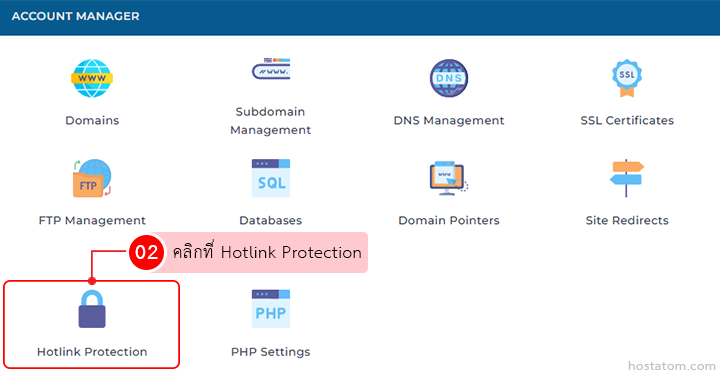
คลิกที่ Hotlink Protection ในหมวด ACCOUNT MANAGER

Account Manager grid showing features; Hotlink Protection tile is highlighted with a padlock icon.

กรณีเพิ่มโดเมนที่จะทำ Hotlink Protection

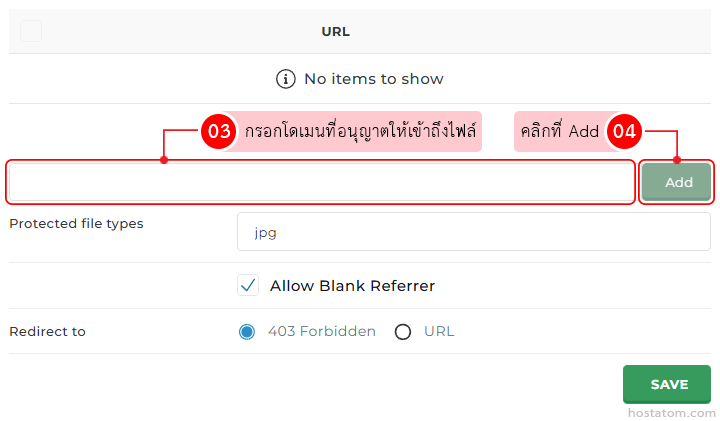
ในช่องเพิ่ม URL ให้กรอกโดเมนที่ที่อนุญาตให้เข้าถึงไฟล์ จากนั้นคลิกที่ Add

Access control form: empty item list, domain input with Add button; Protected file types: jpg; 'Allow Blank Referrer' checked; Redirect to: 403 Forbidden (URL option); Save button

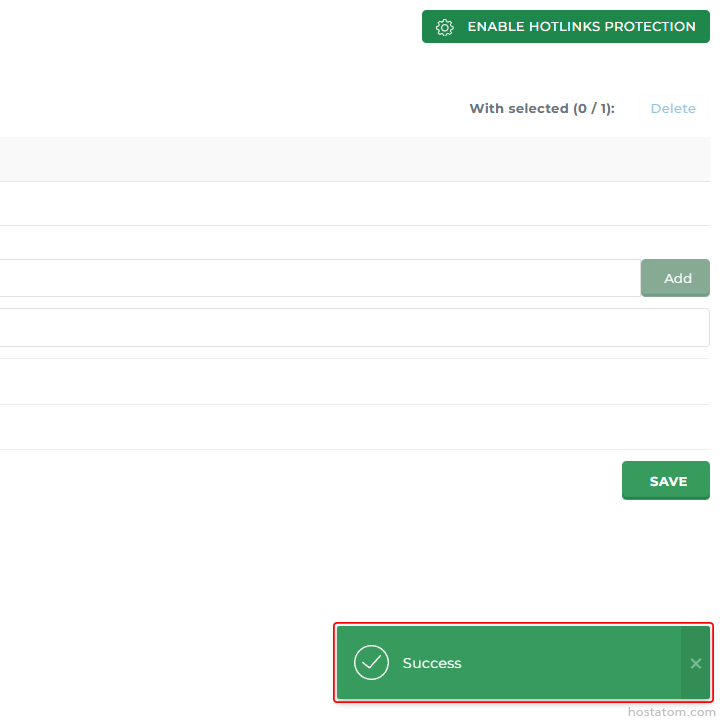
ระบบจะแจ้งว่าได้เพิ่มโดเมนดังกล่าวไว้ใน Hotlink Protection แล้ว

Admin settings page with an 'Enable Hotlinks Protection' button, form fields, Add and Save buttons, and a bottom success toast.

กรณีเพิ่มประเภทไฟล์ที่จะทำ Hotlink Protection

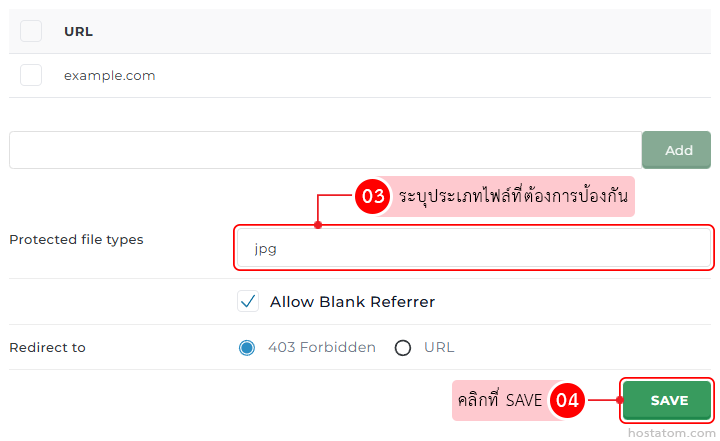
ระบุประเภทไฟล์ที่ต้องการป้องกันในหัวข้อ Protected file types (ไม่ต้องใส่จุดด้านหน้านามสกุลไฟล์ และหากต้องการเพิ่มประเภทไฟล์อื่นด้วย ให้คั่นด้วยเครื่องหมายคอมมา) จากนั้นคลิกที่ SAVE

Settings panel for protecting file types; currently set to jpg, with Allow Blank Referrer, Redirect options (403 Forbidden or URL) and a Save button.

ระบบจะแจ้งว่าได้เพิ่มนามสกุลของไฟล์ดังกล่าวไว้ใน Hotlink Protection แล้ว
Admin settings page with an 'Enable Hotlinks Protection' button, form fields, Add and Save buttons, and a bottom success toast.

หากคุณกำลังมองหาเว็บโฮสติ้งที่ใช้งานง่ายและปลอดภัย สามารถดูรายละเอียดแพ็กเกจ Web Hosting ของเราได้ที่
👉 https://www.hostatom.com/web-hosting