ชั้น 29 ออฟฟิศเศส แอท เซ็นทรัลเวิลด์

999/9 พระราม 1 กรุงเทพฯ 10330

บริการตลอด 24 ชั่วโมง

ทุกวัน ไม่เว้นวันหยุด

0-2107-3466

โทรเลยดิจะรออะไร

knowledge base › DirectAdmin › DirectAdmin User Level › วิธีเพิ่มสิทธิ์ให้ผู้ใช้ฐานข้อมูลเข้าถึงฐานข้อมูลใน DirectAdmin

วิธีเพิ่มสิทธิ์ให้ผู้ใช้ฐานข้อมูลเข้าถึงฐานข้อมูลใน DirectAdmin

Manage user access database DirectAdmin

หลังจากสร้างฐานข้อมูลและผู้ใช้ฐานข้อมูลใน DirectAdmin เรียบร้อยแล้ว ในบางกรณี คุณสามารถกำหนดให้ผู้ใช้ฐานข้อมูลหนึ่งสามารถเข้าถึงฐานข้อมูลหลายชุด หรือให้ฐานข้อมูลเดียวรองรับผู้ใช้หลายคนได้ตามขั้นตอนต่อไปนี้

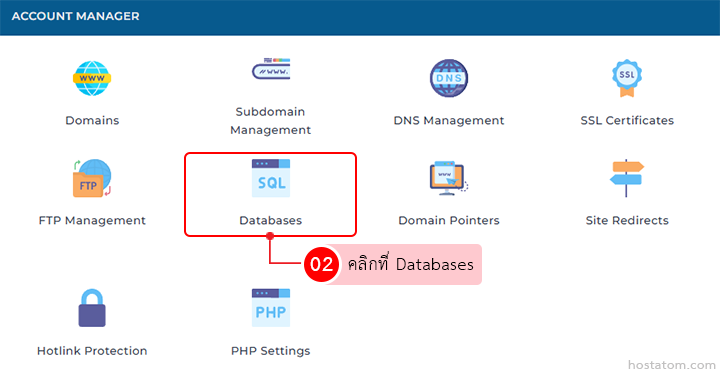
คลิกที่ Databases ในหมวด ACCOUNT MANAGER

Account Manager dashboard; Databases tile highlighted with red outline among domain management options.

กรณีที่เพิ่มจากหน้าจัดการฐานข้อมูล

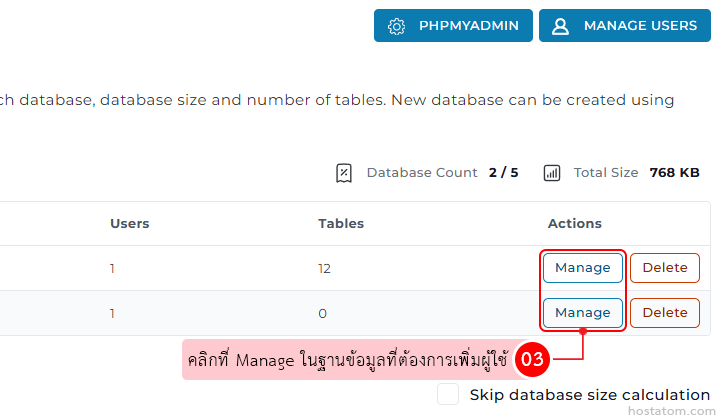
คลิกที่ Manage ในฐานข้อมูลที่ต้องการเพิ่มผู้ใช้

Table of databases with Actions column; two rows show blue Manage buttons and orange Delete buttons beside them.

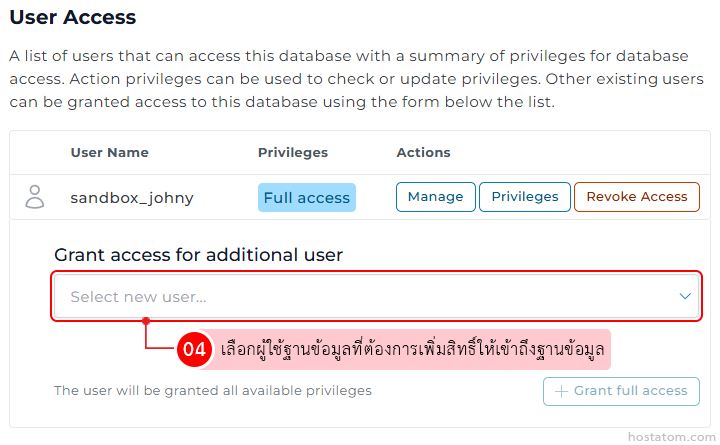
ในส่วน User Access ให้เลือกผู้ใช้ฐานข้อมูลที่ต้องการเพิ่มสิทธิ์ให้เข้าถึงฐานข้อมูลจากหัวข้อ Grant access for additional user

User Access: table showing a user, privileges, and actions with buttons to Manage, Privileges, or Revoke Access; form to grant access via a dropdown labeled Select new user... and a Grant full access button below.

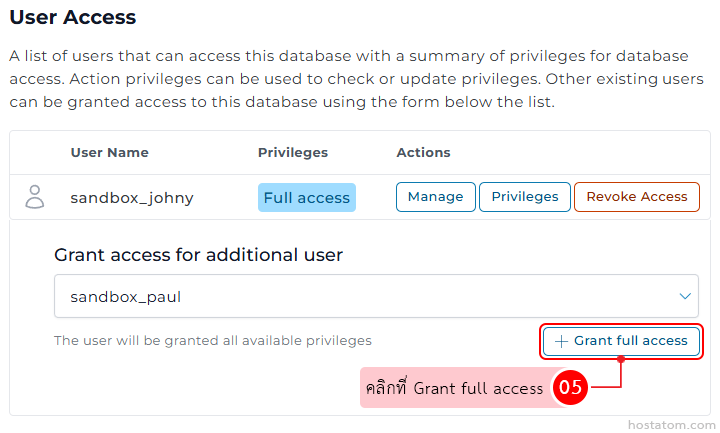
คลิกที่ Grant full access

User Access panel with a user sand box_johny having Full access and action buttons (Manage, Privileges, Revoke). A section to grant full access to sandbox_paul via a dropdown and a 'Grant full access' button.

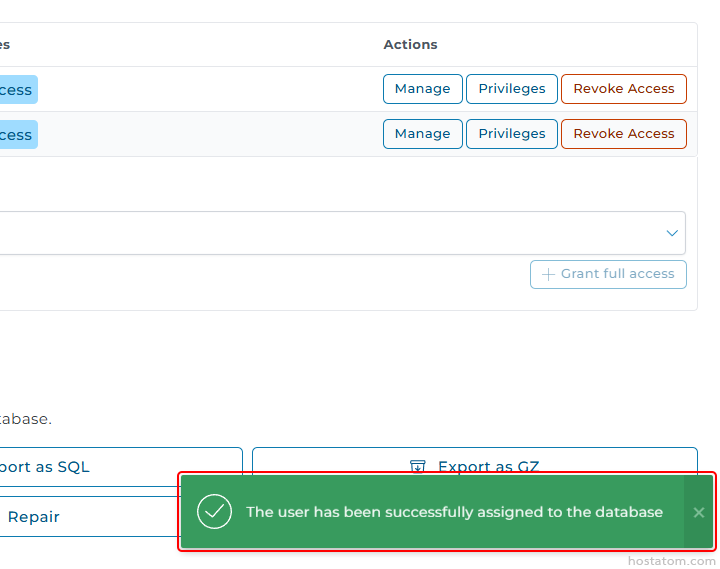
ระบบจะแจ้งว่าได้เพิ่มสิทธิ์เข้าถึงฐานข้อมูลให้กับผู้ใช้ฐานข้อมูลดังกล่าวแล้ว

Green success toast: a checkmark icon and message, “The user has been successfully assigned to the database.”

กรณีที่เพิ่มจากหน้าจัดการผู้ใช้งาน

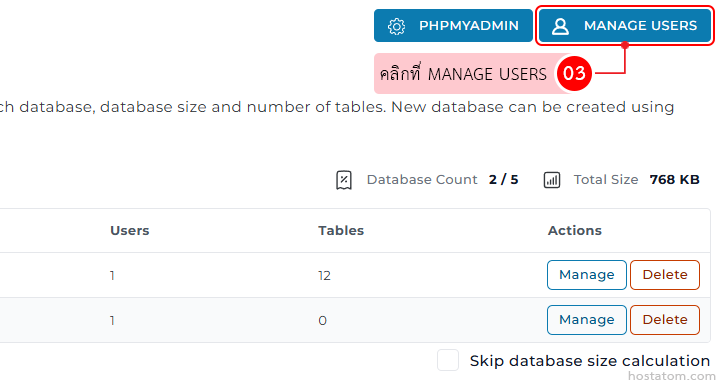
คลิกที่ MANAGE USERS

Admin panel for managing a database: top navigation showing PHPMyAdmin and a highlighted 'Manage Users' button; below is a table with columns Users, Tables, and Actions, with each row containing blue 'Manage' and orange 'Delete' buttons.

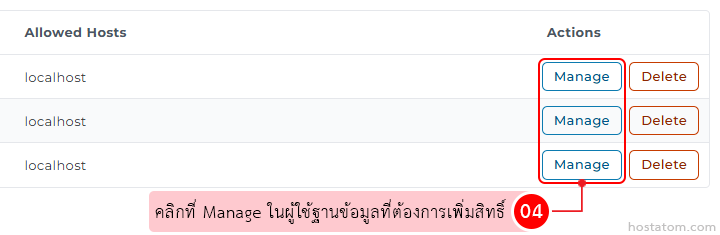
คลิกที่ Manage ในผู้ใช้ฐานข้อมูลที่ต้องการเพิ่มสิทธิ์

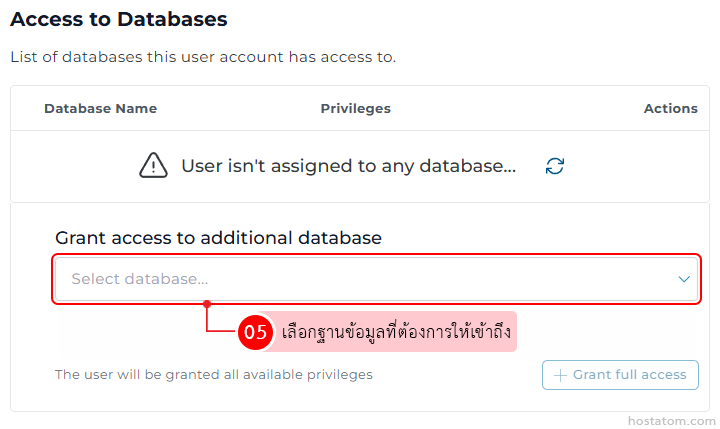
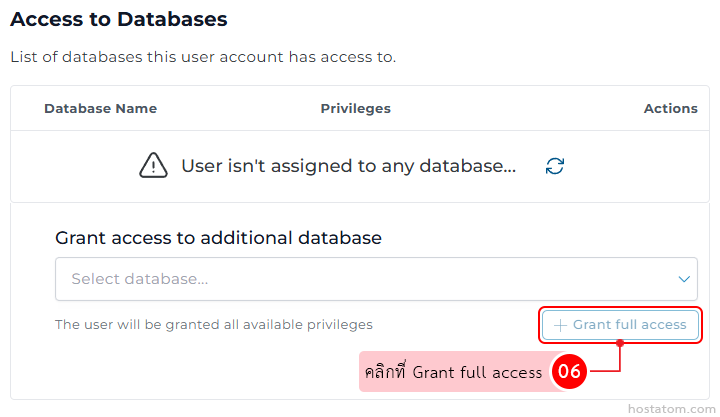
ในส่วน Access to Databases ให้เลือกฐานข้อมูลที่ต้องการให้เข้าถึงจากหัวข้อ Grant access to additional database

Screen shows an 'Access to Databases' panel with a warning that the user isn't assigned to any database, and a 'Grant full access' area containing a 'Select database...' dropdown to choose which database to grant access to.

คลิกที่ Grant full access

UI panel for database access: shows a warning that the user isn’t assigned to any database, a dropdown to select a database, a note that all privileges will be granted, and a '+ Grant full access' action button.

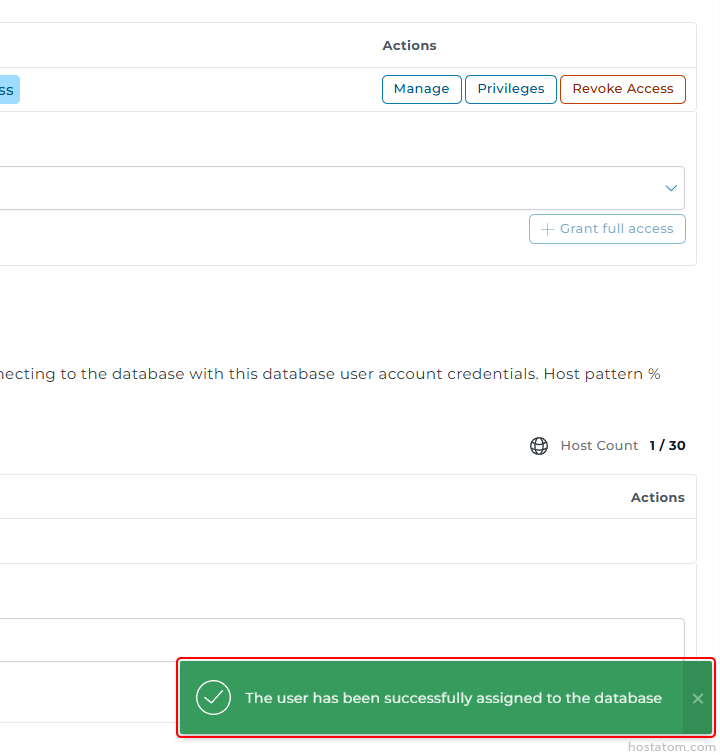
ระบบจะแจ้งว่าได้เพิ่มสิทธิ์ให้ผู้ใช้ฐานข้อมูลเข้าถึงฐานข้อมูลดังกล่าวแล้ว
Green success toast at the bottom saying: 'The user has been successfully assigned to the database' with a checkmark icon.

หากคุณกำลังมองหาเว็บโฮสติ้งที่ใช้งานง่ายและปลอดภัย สามารถดูรายละเอียดแพ็กเกจ Web Hosting ของเราได้ที่
👉 https://www.hostatom.com/web-hosting