ชั้น 29 ออฟฟิศเศส แอท เซ็นทรัลเวิลด์

999/9 พระราม 1 กรุงเทพฯ 10330

บริการตลอด 24 ชั่วโมง

ทุกวัน ไม่เว้นวันหยุด

0-2107-3466

โทรเลยดิจะรออะไร

knowledge base › DirectAdmin › DirectAdmin User Level › วิธีกู้คืนไฟล์หรือโฟลเดอร์ที่ถูกลบผ่าน File Manager ใน DirectAdmin

วิธีกู้คืนไฟล์หรือโฟลเดอร์ที่ถูกลบผ่าน File Manager ใน DirectAdmin

How to restore file folder File Manager in DirectAdmin

ระหว่างการจัดการไฟล์เว็บไซต์ผ่าน File Manager ใน DirectAdmin บางครั้งก็อาจมีการเผลอลบไฟล์หรือโฟลเดอร์สำคัญโดยไม่ตั้งใจได้ หากยังไม่ได้ถูกลบถาวร คุณสามารถกู้ไฟล์หรือโฟลเดอร์เหล่านั้นกลับมายังตำแหน่งเดิมได้ตามขั้นตอนต่อไปนี้

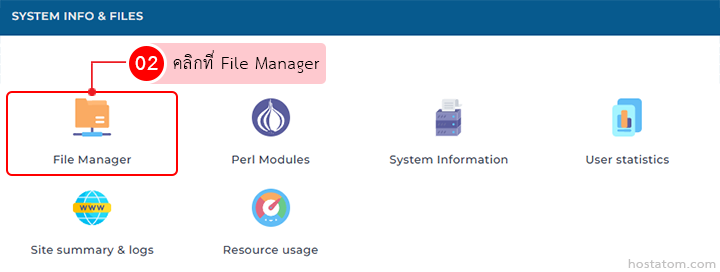
คลิกที่ File Manager ในหมวด SYSTEM INFO & FILES

Dashboard with icons for File Manager (highlighted), Perl Modules, System Information, User statistics, Site summary & logs, and Resource usage.

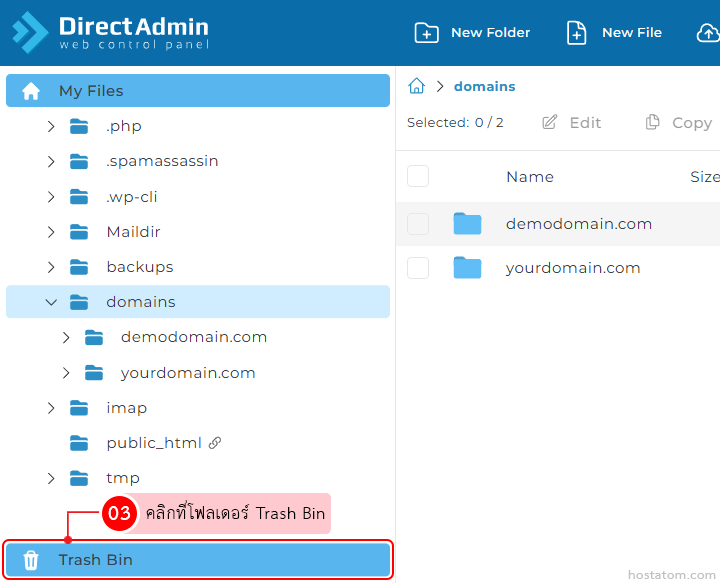
คลิกที่โฟลเดอร์ Trash Bin

DirectAdmin panel: left sidebar with domains folder expanded and Trash Bin highlighted at the bottom in blue outline.

กรณีที่กู้คืนไฟล์หรือโฟลเดอร์ทีละรายการ

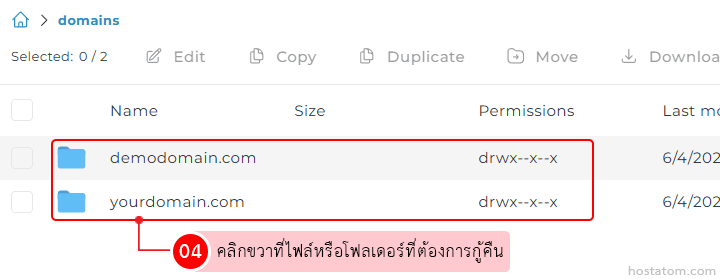
คลิกขวาที่ไฟล์หรือโฟลเดอร์ที่ต้องการกู้คืน

Directory listing with two domain folders: demodomain.com and yourdomain.com, permissions drwx-x-x; Thai caption about right-click to restore.

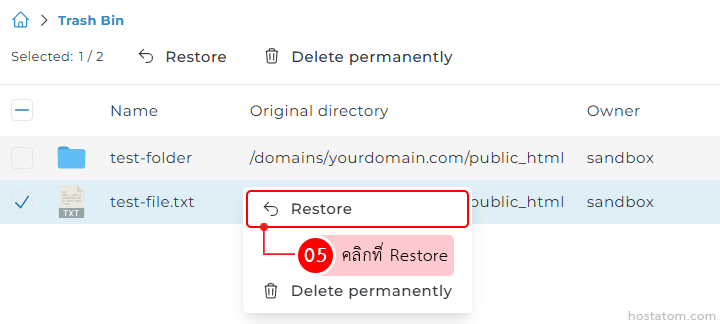
คลิกที่ Restore

Screenshot of a Trash Bin UI with test-folder and test-file.txt listed; a file is selected and a context menu shows Restore highlighted (05) and Delete permanently below it.

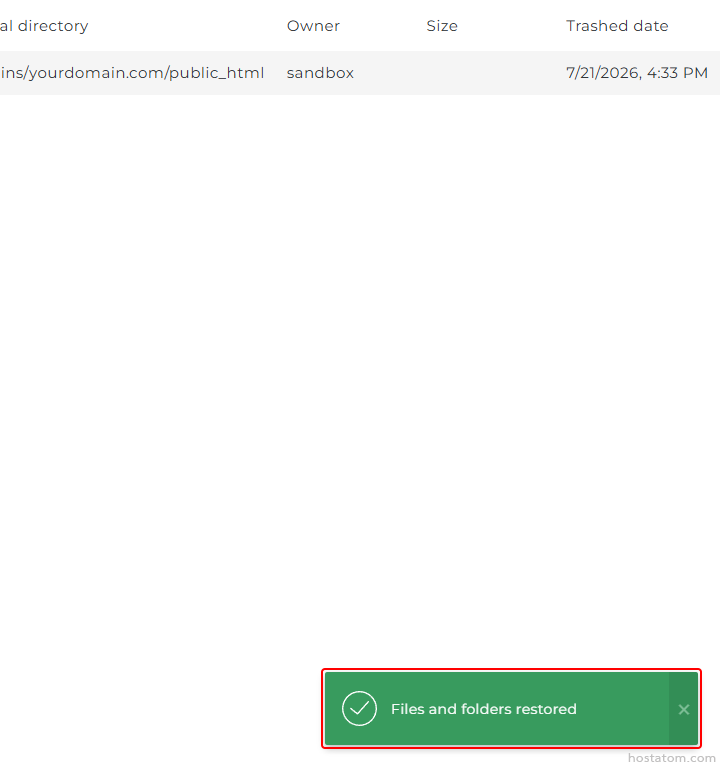
ระบบจะแจ้งว่าได้กู้คืนไฟล์หรือโฟลเดอร์ดังกล่าวแล้ว

Green bottom-right success toast reading 'Files and folders restored' with a checkmark icon, indicating restoration completed.

กรณีที่กู้คืนไฟล์หรือโฟลเดอร์หลายรายการ

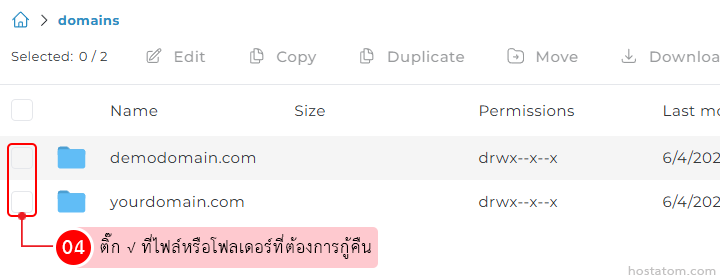
ติ๊ก √ ที่ไฟล์หรือโฟลเดอร์ที่ต้องการกู้คืน

Screenshot of a file manager showing two folders with checkboxes; instruction in Thai to tick the files or folders to restore.

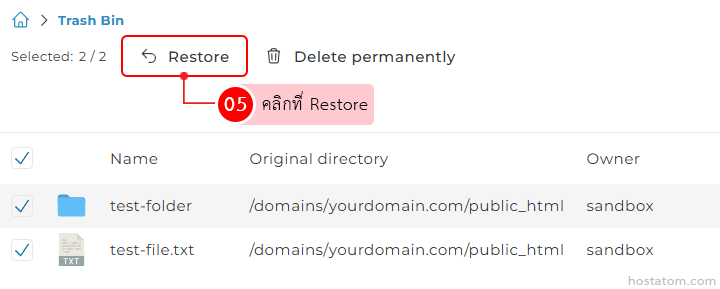
คลิกที่ Restore

Trash bin UI with the Restore button highlighted; two items selected: test-folder and test-file.txt, showing their original directory and owner.

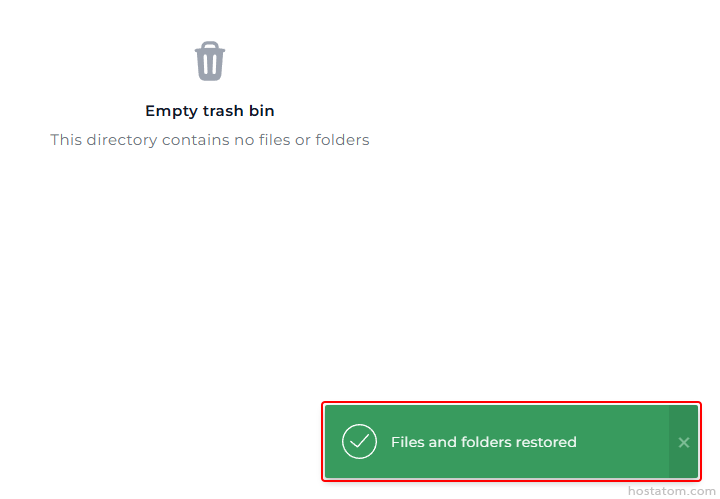
ระบบจะแจ้งว่าได้กู้คืนไฟล์หรือโฟลเดอร์ที่เลือกแล้ว
Icon indicating an empty trash bin in a file manager, with a green 'Files and folders restored' success notification on the bottom-right.

หากคุณกำลังมองหาเว็บโฮสติ้งที่ใช้งานง่ายและปลอดภัย สามารถดูรายละเอียดแพ็กเกจ Web Hosting ของเราได้ที่
👉 https://www.hostatom.com/web-hosting