ชั้น 29 ออฟฟิศเศส แอท เซ็นทรัลเวิลด์

999/9 พระราม 1 กรุงเทพฯ 10330

บริการตลอด 24 ชั่วโมง

ทุกวัน ไม่เว้นวันหยุด

0-2107-3466

โทรเลยดิจะรออะไร

Home Roundcube วิธี Export รายชื่อผู้ติดต่อใน RoundCube Webmail

วิธี Export รายชื่อผู้ติดต่อใน RoundCube Webmail

Export contacts RoundCube Webmail

การ Export รายชื่อผู้ติดต่อ เป็นหนึ่งในวิธีที่ช่วยสำรองข้อมูล Address Book ไว้สำหรับใช้งานในอนาคต ไม่ว่าจะเพื่อป้องกันข้อมูลสูญหาย หรือนำไปใช้งานในบริการอีเมลอื่น ซึ่งใน Roundcube Webmail คุณสามารถเลือก Export รายชื่อผู้ติดต่อได้ตามขั้นตอนต่อไปนี้

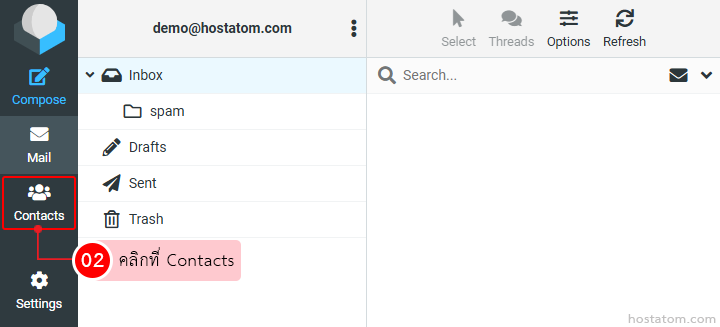
คลิกที่ Contacts

Left-side navigation of an email app; the 'Contacts' tab is selected, highlighted with a red box, indicating to click Contacts.

กรณีที่ Export รายชื่อผู้ติดต่อทั้งหมด

คลิกที่ Export

Toolbar with icons for Create, Print, Delete, Search, Import and Export; Export button is highlighted.

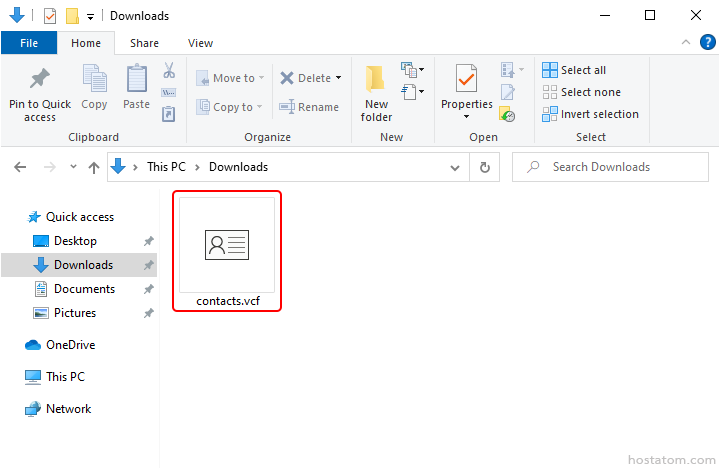
ระบบจะดาวน์โหลดไฟล์ Export ไปไว้ที่โฟลเดอร์ดาวน์โหลดในเครื่อง (โฟลเดอร์ดาวน์โหลดขึ้นอยู่กับการตั้งค่าของผู้ใช้)

Selected contacts.vcf in Downloads showing a vCard contact file

กรณีที่ Export เฉพาะบางรายชื่อ

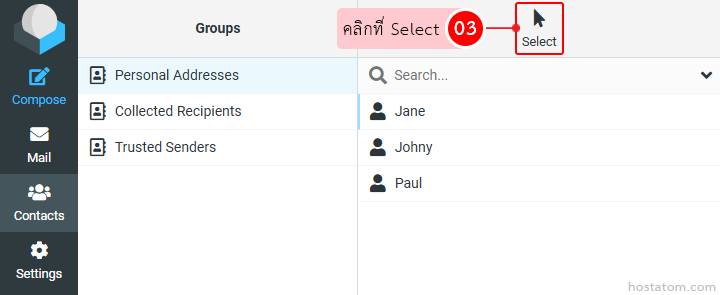
คลิกที่ Select

UI of a contacts app: left navigation with Group tab; three lists (Personal Addresses, Collected Recipients, Trusted Senders); right pane shows a search field and names Jane, Johnny, Paul; 'Select 03' cue with cursor.

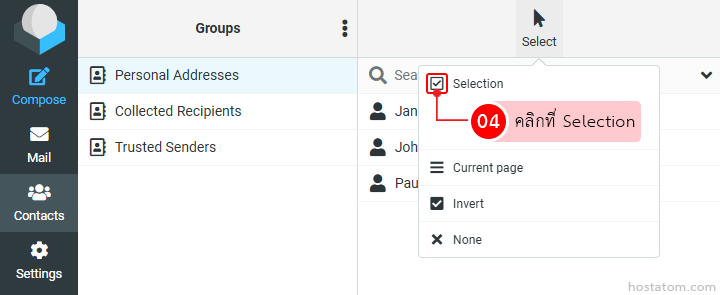
คลิกที่ Selection

Screenshot of a contacts/Groups UI with left navigation (Compose, Mail, Contacts, Settings), a Groups pane listing Personal Addresses and others, and an open Selection dropdown with options like Current page and Invert.

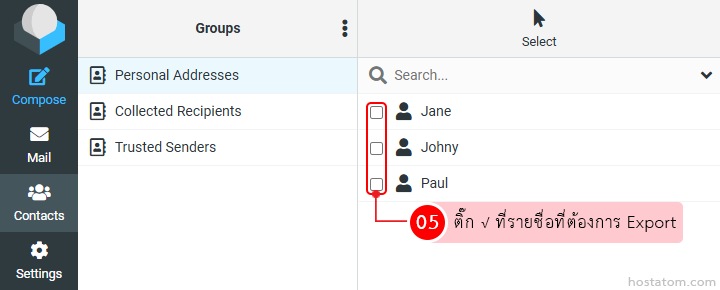
ติ๊ก √ ที่รายชื่อที่ต้องการ Export

Contact manager UI: left navigation with Groups; checkboxes beside Jane, Johny, and Paul to export selected contacts.

คลิกที่เมนู Drop Down ของ Export

Toolbar with icons for Create, Print, Delete, Search, Import, and Export; the Export drop-down button is highlighted with a pink tooltip reading in Thai: คลิกที่เมนู Drop Down ของ Export.

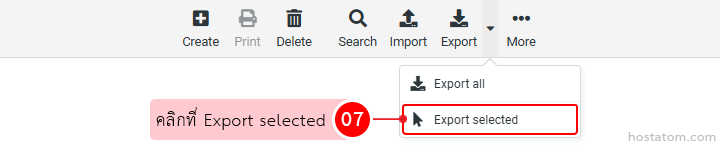
คลิกที่ Export selected

UI toolbar with export menu open showing Export all and Export selected; 'Export selected' is highlighted. Note the pink tooltip with Thai text next to the option.

ระบบจะดาวน์โหลดไฟล์ Export ไปไว้ที่โฟลเดอร์ดาวน์โหลดในเครื่อง (โฟลเดอร์ดาวน์โหลดขึ้นอยู่กับการตั้งค่าของผู้ใช้)

Selected contacts.vcf in Downloads showing a vCard contact file

หากคุณกำลังมองหาเว็บโฮสติ้งที่ใช้งานง่ายและปลอดภัย สามารถดูรายละเอียดแพ็กเกจ Web Hosting ของเราได้ที่
👉 https://www.hostatom.com/web-hosting