ชั้น 29 ออฟฟิศเศส แอท เซ็นทรัลเวิลด์

999/9 พระราม 1 กรุงเทพฯ 10330

บริการตลอด 24 ชั่วโมง

ทุกวัน ไม่เว้นวันหยุด

0-2107-3466

โทรเลยดิจะรออะไร

Home DirectAdmin User Level วิธีเปลี่ยนรหัสผ่านบัญชี FTP ใน DirectAdmin

วิธีเปลี่ยนรหัสผ่านบัญชี FTP ใน DirectAdmin

Change FTP password DirectAdmin

การเปลี่ยนรหัสผ่าน FTP เป็นหนึ่งในวิธีง่าย ๆ ที่ช่วยเพิ่มความปลอดภัยให้เว็บไซต์ได้อย่างมีประสิทธิภาพ โดยเฉพาะในกรณีที่มีการแชร์บัญชีให้ทีมงาน นักพัฒนา หรือเคยใช้งานผ่านเครื่องสาธารณะมาก่อน โดยใน DirectAdmin คุณสามารถเปลี่ยนรหัสผ่านบัญชี FTP ได้เองง่าย ๆ ตามขั้นตอนต่อไปนี้

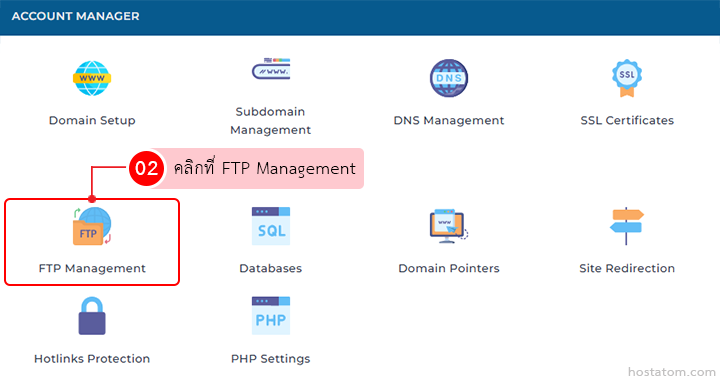
คลิกที่ FTP Management ในหมวด ACCOUNT MANAGER

Dashboard grid of account-management icons; FTP Management tile is highlighted with a red border and a pink tooltip overlay (Thai text)

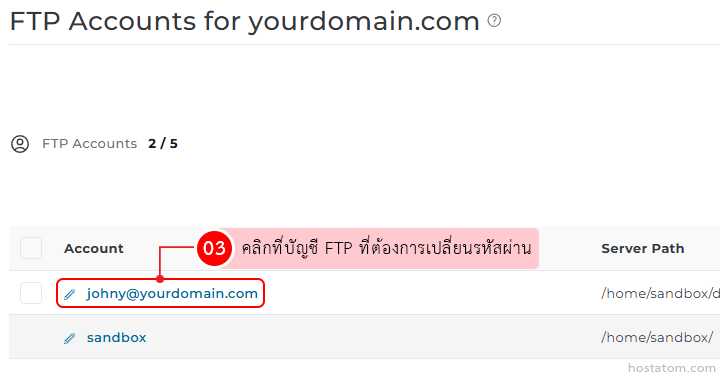
คลิกที่บัญชี FTP ที่ต้องการเปลี่ยนรหัสผ่าน

FTP Accounts list with the selected account johnny@yourdomain.com for password change

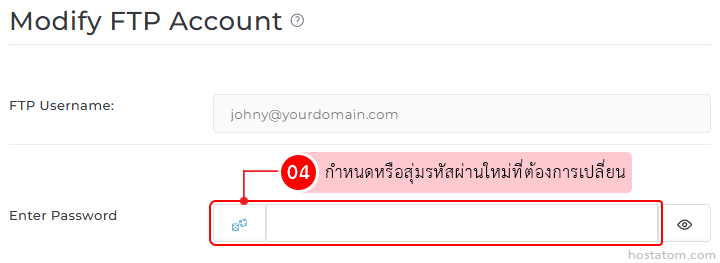
กำหนดหรือสุ่มรหัสผ่านใหม่ที่ต้องการเปลี่ยนในช่อง Enter Password

Modify FTP Account form: username input and a red-outlined password field with Thai instruction to set or generate a new password.

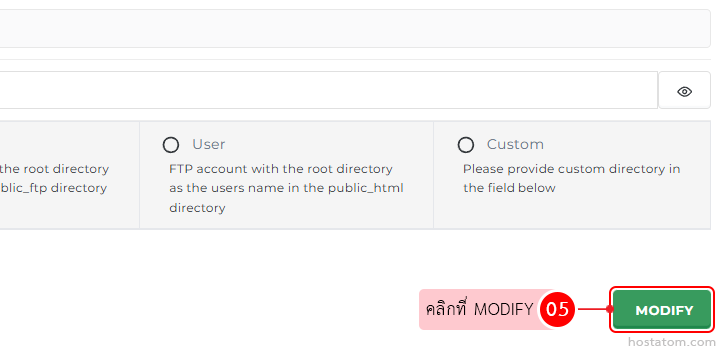
คลิกที่ MODIFY

UI with two options (User, Custom) and a green MODIFY button on the right; pink Thai annotation bubble reads 'คลิกที่ MODIFY 05'

ระบบจะแจ้งว่าได้เปลี่ยนรหัสผ่านของบัญชี FTP ดังกล่าวแล้ว
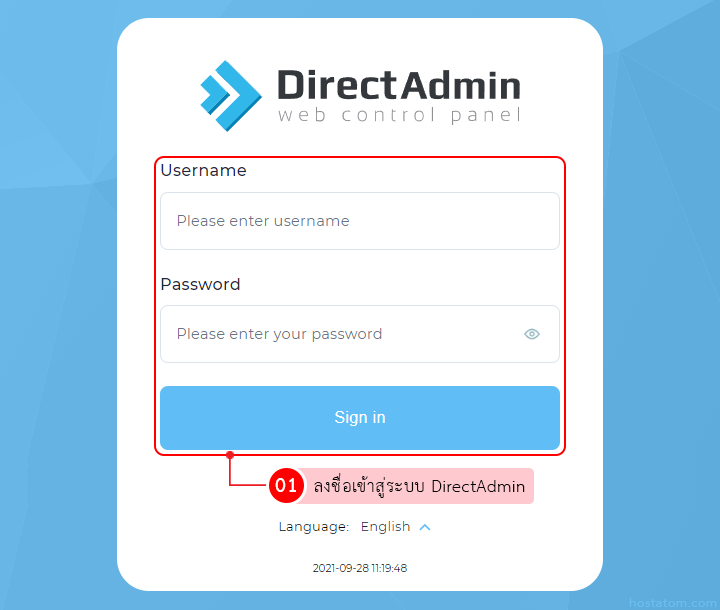
Web admin panel for FTP accounts showing a green success toast labeled 'Account modified' at bottom-right, with a blue 'Create FTP Account' button at top-right and action options across the bar.

หากคุณกำลังมองหาเว็บโฮสติ้งที่ใช้งานง่ายและปลอดภัย สามารถดูรายละเอียดแพ็กเกจ Web Hosting ของเราได้ที่
👉 https://www.hostatom.com/web-hosting